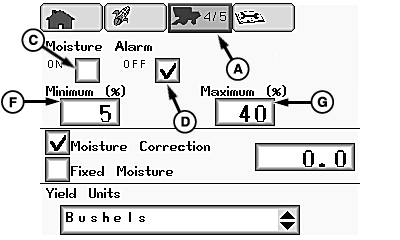
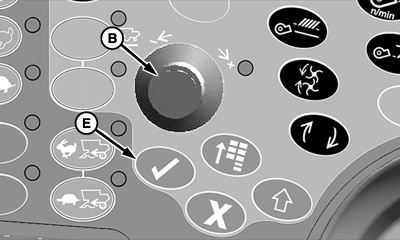
Change Moisture Settings and Yield UnitsNOTE: Page appears if equipped with moisture sensor. Moisture Sensor SettingsFrom setup pages icon (A), rotate selection dial (B) until ON box (C) or OFF box (D) is highlighted:
When desired box is highlighted, press confirm switch (E). Rotate selection dial until minimum box (F) or maximum box (G) is highlighted: NOTE: This is used to determine set points (minimum and maximum) for activation of moisture alarm.
When desired box is highlighted, press confirm switch. Rotate selection dial until desired value is shown in box. Press confirm switch to save values. |
|
OUO6075,0000A42 -19-16JUL07-1/3 |
|
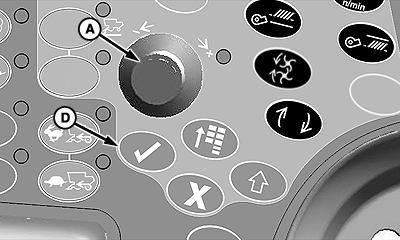
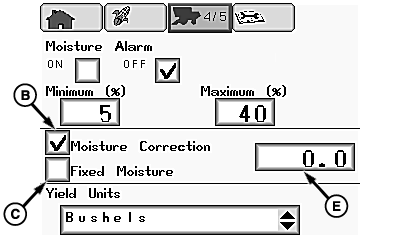
Moisture Correction/Fixed Moisture Settings Rotate selection dial (A) until moisture correction box (B) or fixed moisture box (C) is highlighted: IMPORTANT: Changing moisture correction will not change data already saved. After changes are made, all harvest information collected from that point will reflect the changes.
When desired box is highlighted, press confirm switch (D). Rotate selection dial until value/change box (E) is highlighted and press confirm switch. Rotate selection dial until desired value is shown in box. Press confirm switch to save value. |
|
OUO6075,0000A42 -19-16JUL07-2/3 |
|
Yield Units Settings
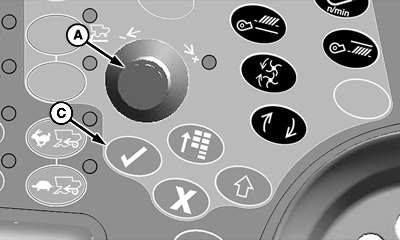
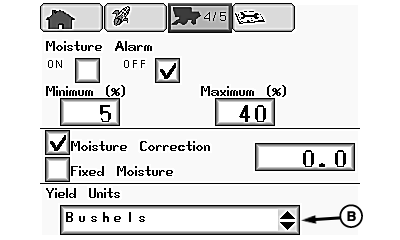
Rotate selection dial (A) until yield units menu (B) is highlighted. Press confirm switch (C). Rotate selection dial to choose desired yield units:
Once desired yield units is chosen, press confirm switch. NOTE: Operator selects desired global units from regional display settings page for desired area units, refer to Regional Settings, Time/Date Settings, Units of Measurement later in this section.
|
|
OUO6075,0000A42 -19-16JUL07-3/3 |