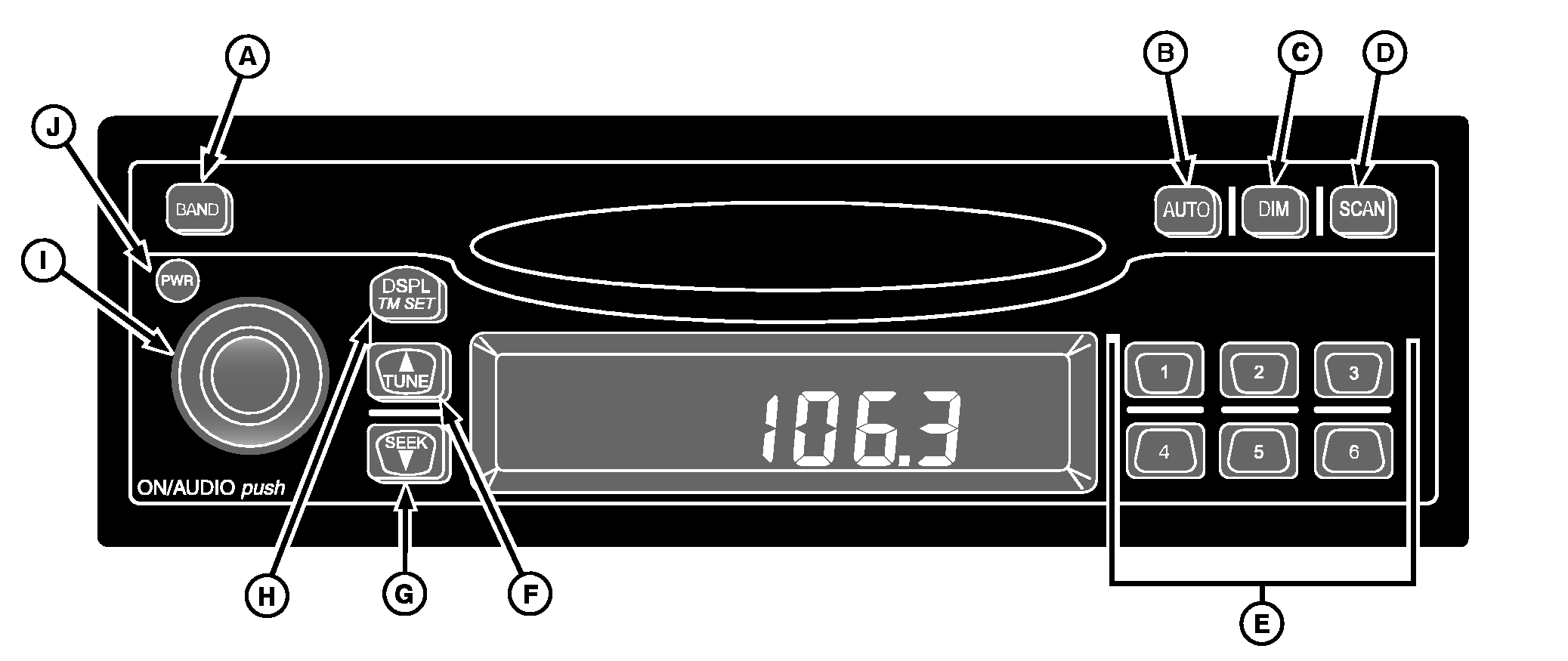
Deere-Delco AM/FM Stereo Radio with Weatherband
|
|
|
|
|
|
Setting Clock
1.
Turn ignition ON.
Seconds are reset to zero when the minutes setting is changed. After five seconds of inactivity, display will return to default and clock will be set. General Receiver FunctionsReceiver is equipped with two FM radio bands, FM1 and FM2. Two bands are the same, but allow you to set six presets in each band, for a total of 12 FM presets. |
Turning On Power
With ignition ON, the receiver may be turned ON or OFF by pressing PWR button (J). Pressing ON/AUDIO knob (I) will also activate the receiver. DisplayReceiver will display the time of day when the receiver is OFF. Momentarily pressing DISPL/TM SET button (H) when receiver is ON allows you to toggle between displays. When the receiver is in AM, FM1, FM2 or WX, the display will toggle between the frequency and time of day. Setting Default Display1.
Press and hold DSPL/TM SET button for at least two seconds until hour digits flash.
|
OUO6075,0000BF4 -19-25JUL07-1/2 |
|
2.
Press push-button 6 to change display default.
After five seconds of inactivity, the selected default will be displayed. Adjusting Brightness of DisplayIf dash dimmer does not control the brightness of the receiver display, press and hold DIM button (C) until "DIM" and brightness level appear on display. Rotate AUDIO knob clockwise to increase brightness of receiver display and counterclockwise to decrease it. Adjusting Receiver SettingsTo adjust Volume, Bass, Treble, Fade, and Balance, press and release ON/AUDIO knob repeatedly until desired feature appears on display. Volume - Volume is the default function. Rotate AUDIO knob clockwise to increase volume and counterclockwise to decrease it. Display will show "VOL" and volume level. |
Bass - Press AUDIO knob until "BASS" and present level appear on display. Rotate knob clockwise to increase bass sound and counterclockwise to decrease it. Treble - Press AUDIO knob until "TREB" and present level appear. Rotate knob clockwise to increase treble sound and counterclockwise to decrease it. Fade - Press AUDIO knob until "FADE" and present level appear on display. Rotate knob clockwise to move sound to front speakers and counterclockwise to move sound to rear speakers. Balance - Press AUDIO knob until "BAL" and present level appear. Rotate knob clockwise to move sound to right speakers and counterclockwise to move sound to left speakers. After five seconds of inactivity, receiver will return to the default display. |
OUO6075,0000BF4 -19-25JUL07-2/2 |