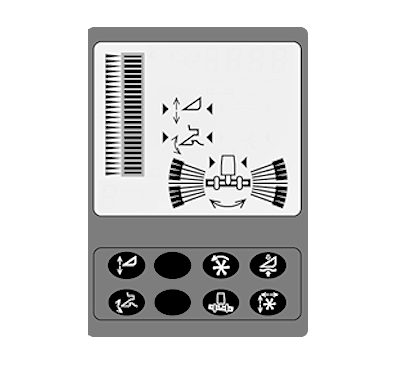
Automatic Header Height Control SystemAutomatic Header Height Control system compensates for uneven ground and controls horizontal and vertical positions of the header. The system continuously compares the preset position and the actual position, thus keeping the header in the desired working position. Enter values using the response rate adjust, sensitivity adjust, and the selection dial on the armrest. System Requirements:
Lateral Tilt Adjustment-Two modes
Platform Height Adjustment-Four Modes
|
|
NS43404,000062A -19-21APR08-1/3 |
|
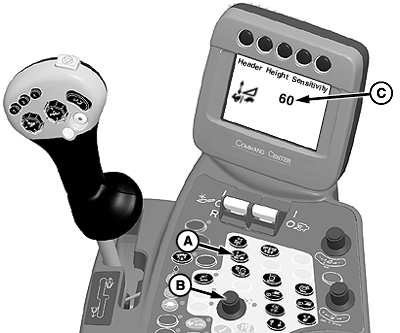
NOTE: It is possible to override automatic modes manually. Height Sensing and Active Header Float Pressure Sensitivity (Automatic Functions) controls the speed of response for header movements when in automatic sensing and automatic float modes. Operation: NOTE: Press feeder house rate adjust and sensitivity adjust switch twice to adjust sensitivity settings (C). Sensitivity setting are shown on CommandCenter display when adjusting. Settings are adjusted between 0 to 100. Press feeder house rate adjust and sensitivity adjust switch (A) twice and use selection dial (B) to adjust speed at which header follows ground contour. Turn selection dial clockwise to increase response rate or counterclockwise to decrease response rate settings. |
|
NS43404,000062A -19-21APR08-2/3 |
|
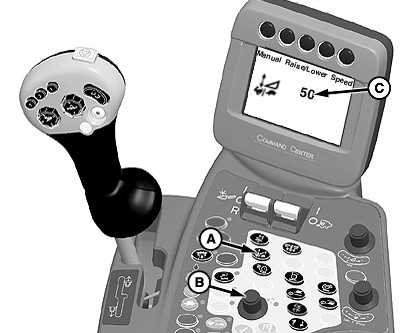
Manual Raise/Lower Speed (Manual Functions) controls response rate of header raise/lower functions for manual control or when in automatic height resume mode. Operation: NOTE: Press feeder house rate adjust and sensitivity adjust switch once to adjust rate settings (C). Rate setting are shown on CommandCenter display when adjusting. Settings are adjusted between 0 to 100. Press feeder house rate adjust and sensitivity adjust switch (A) once and use selection dial (B) to adjust reaction rate of the header. Turn selection dial clockwise to increase response rate or counterclockwise to decrease response rate settings. |
|
NS43404,000062A -19-21APR08-3/3 |