CommandCenter DisplayPress button (A, B, C or D) to select desired type of information to view or change. Corresponding icon on display highlights and show number of available pages within that selection. Once information type is selected, press button again to advance through available pages. Details on each of these pages are given later in this section. |
|

| Display Navigation | |||||
|---|---|---|---|---|---|
| Button | PAGE 1 | PAGE 2 | PAGE 3 | PAGE 4 | PAGE 5 |
| (A) Home | View Harvest Monitor information, crop and machine settings | Viewable machine settings (six reconfigure windows) | |||
| (B) Harvesting Information | View Yield and moisture, select and change cut width | View and zero values of fuel use, area/distance, weight and moisture | View and change field totalsa | View and change crop totalsa | |
| (C) Combine Setup | Change current machine settings | Select crop, grain seed size, farm and fieldb | Select/Change current header settings View header hours |
Select/Change moisture alarm min/max, moisture correction and yield unitsc | Change Harvest Smart (max harvest speed, target engine speed, response rate, target pressure)d |
| (D) Diagnostics and Calibration | Active Alarms | Calibrations | Diagnostic Readings | Special Tests | |
| (E) | Not currently used. | ||||
| aInformation appears on GreenStar display (if equipped) instead of on CommandCenter. | |||||
| bCrop, farm, and field appears on GreenStar display (if equipped) instead of on CommandCenter. | |||||
| cPage appears if equipped with moisture sensor. | |||||
| dPage appears if equipped with Harvest Smart Feed Rate. | |||||
OUO6075,00000BA -19-21APR08-1/2 |
|
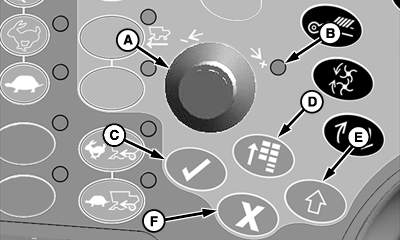
Once desired CommandCenter display page is selected, the display is navigated using the following dial and switches on the armrest:
|
|
OUO6075,00000BA -19-21APR08-2/2 |