Select Radio Source with Generation 4 CommandCenter™
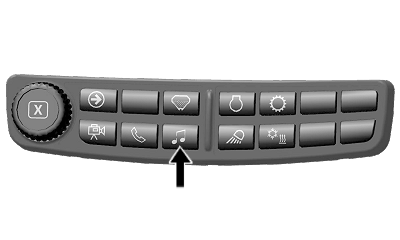
N119223-UN-24JUL15
Audio Shortcut Button on Navigation Bar
RXA0147929-UN-13APR15
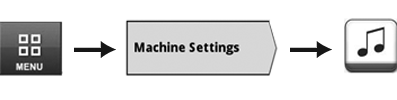
Menu → Machine Settings Tab → Audio Icon
RXA0132517-UN-15MAY13
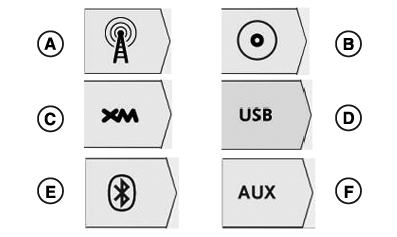
Source Select Tabs
A - FM, AM, and Weather Tab
B - CD/MP3 Tab (Premium Radio Only)
C - XM Tab (Premium Radio Only)
D - USB Tab (Premium Radio Only)
E - Bluetooth® Audio Tab (Premium Radio Only)
F - Auxiliary Tab
Use radio source tabs on Generation 4 CommandCenter™ to select radio source.
When radio is on, radio page navigates to home page of current source selected. When radio is off, content blocker displays.
Selecting radio source will not turn radio on. Turn radio ON by pressing ON/OFF button on radio faceplate.
To access audio main page, use Audio Shortcut Button on Navigation Bar or follow alternative path:
- Select Menu.
- Select Machine Settings tab.
- Select Audio icon.
- Select desired radio source.
|
Bluetooth is a trademark of Bluetooth SIG CommandCenter is a trademark of Deere & Company |
CS12167,0000895-19-20160418 |