Manage Paired Bluetooth® Devices (If Equipped)
N119224-UN-24JUL15
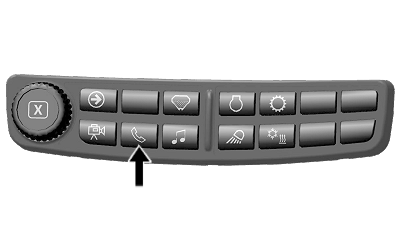
Phone Shortcut Button on Navigation Bar

RXA0147944-UN-13APR15
Advanced Settings Icon → Settings Tab
RXA0147734-UN-30MAR15
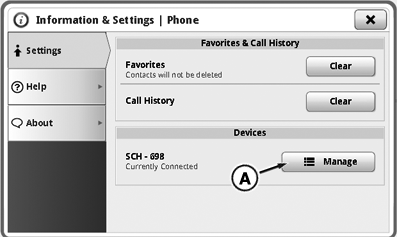
Phone Information & Settings Page
RXA0147733-UN-30MAR15
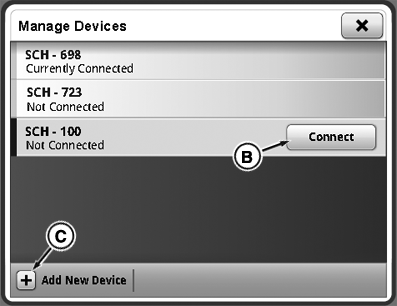
Manage Devices Page
A - Manage Devices Button
B - Connect Device Button
C - Add New Device Button
Use phone advanced settings to connect devices paired to the radio or add new devices to paired list.
- Select Phone Shortcut button on Navigation Bar.
- Select Advanced Settings icon.
- Select Settings tab.
- Select Manage Devices button (A).
- Choose the desired device from the list of paired devices and select Connect Device button (B).
- Select Add New Device button (C) to pair a new Bluetooth® device.
Up to five device pairings can be stored in the radio’s Bluetooth® feature. To learn more about pairing devices, see Pair Bluetooth® Device to Generation 4 CommandCenter™ in this section of this Operator’s Manual.
|
Bluetooth is a trademark of Bluetooth SIG CommandCenter is a trademark of Deere & Company |
CS12167,0000897-19-20160816 |