Concave Sections (Standard Concave Adjust)—Remove and Install
-

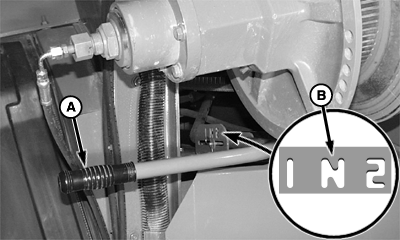
H96927-UN-17JUN10A - Handle
B - Neutral Position
Concave sections are heavy and awkward to handle. Another person may be needed to remove and install concave sections.For ease of removal, close concave completely.
Move handle (A) to shift the rotor gear case in neutral position (B).
-
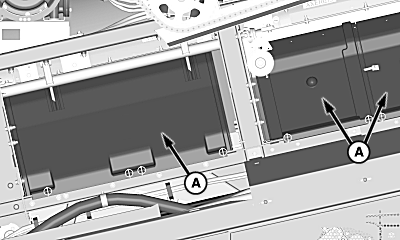
H111238-UN-13MAY14A - Separator Covers
Remove shielding as needed to access separator inspection covers.Remove separator inspection covers (A).
-
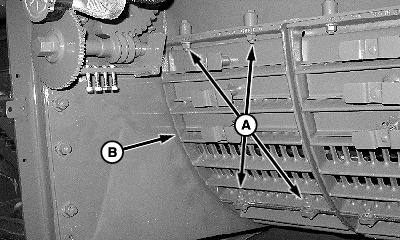
H100377-UN-22FEB11A - Cap Screws
B - Separator Grate
Removing separator grate provides access for rotating rotor.Remove cap screws (A) and separator grate (B).
-
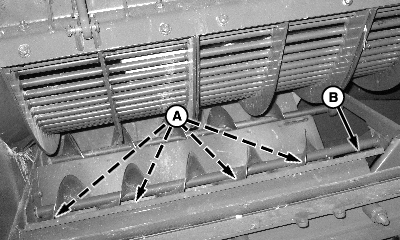
H100378-UN-22FEB11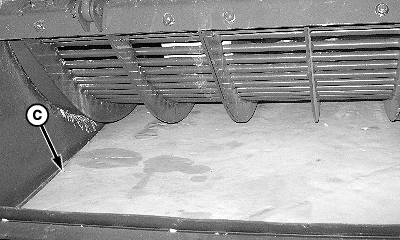
H100380-UN-22FEB11A - Cap Screws (4 used)
B - Diverter
C - Cardboard
Loosen cap screws (A) and remove left-hand sheet metal diverter (B). -
Place a piece of cardboard (C) or poly over conveyor augers. This provides protection for the augers and allows a smooth surface to remove the concaves.
-
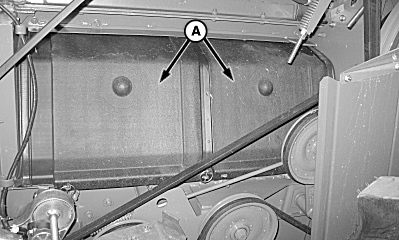
H96929-UN-17JUN10A - Separator Cover (2 used)
Remove shielding as needed to access separator inspection covers. -
Remove quick-lock pins and front two separator covers (A) on the right-hand side of the machine.
-
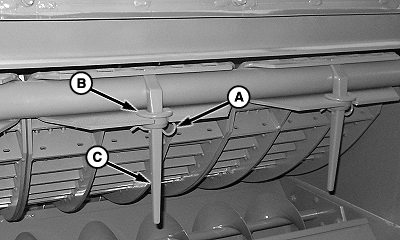
H111561-UN-14JUL14A - Spring Pin
B - Concave Retainer
C - Handle
Remove spring pin (A) from the concave retainer (B). -
Lift concave retainer (B) and remove the handle (C) from each concave section.
-
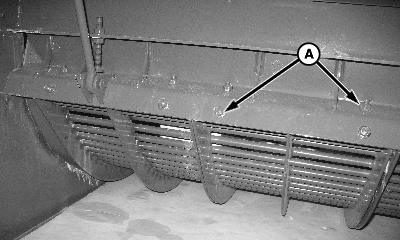
H100381-UN-23FEB11A - Cap Screws (12 used)
Loosen cap screws (A). -
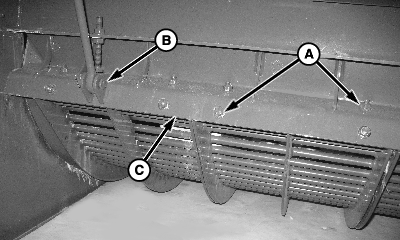
H100382-UN-23FEB11A - Cap Screws (12 used)
B - Pins (2 used)
C - ”Z” Bar
To prevent damage, carefully lower concave onto the auger bed.Remove cap screws (A).
-
Remove cotter pins, pins (B) and ”Z” bar (C).
-
Rotate rotor such that a gap in the threshing element pattern occurs at mid concave.
-
Remove center concave section.
-
Slide rear concave to the center position and remove.
-
Slide front concave to the center position and remove.
-
Inspect wear on concave sections, threshing elements and threshing tines using KXE10110 Clearance Gauge.
-
Install concaves in reverse order.
-
H111561-UN-14JUL14A - Spring Pin
B - Concave Retainer
C - Handle
Install handle (C), concave retainer (B), and spring pin (A) on concave sections. -
H100382-UN-23FEB11A - Cap Screws (12 used)
B - Pins (2 used)
C - ”Z” Bar
Position ”Z” bar (C) over end of concaves and install cap screws, but do not tighten. -
Install pins (B).
-
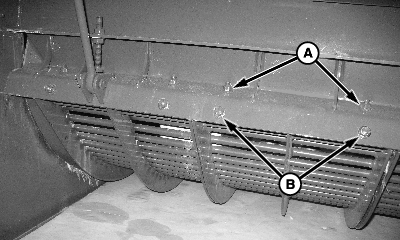
H121120-UN-22MAR17A - Cap Screws (6 used)
B - Cap Screws (6 used)
Be sure the ends of concaves fit snug into ”Z” bar; then tighten top row of the cap screws (A) first. -
Tighten bottom row of the cap screws (B) last.
-
Adjust concave level. See Concave Leveling (Standard Concave Adjust) later in this section.
-
H96929-UN-17JUN10A - Separator Covers
Verify that top edge of separator cover is under clips.Install separator covers (A).
-
Install shielding previously removed to access separator inspection covers.
-
H100377-UN-22FEB11A - Cap Screws (4 used)
B - Separator Grate
Install separator grate (B) and retain with cap screws (A). -
H100378-UN-22FEB11
H100380-UN-22FEB11A - Cap Screws (4 used)
B - Diverter
C - Cardboard
Remove cardboard (C) or poly from conveyor augers. -
Install diverter (B) to original position and tighten cap screws (A).
-
H111238-UN-13MAY14A - Separator Cover
Install separator inspection covers (A). -
Install shielding previously removed to access separator inspection covers.
-
Place rotor drive gear case in desired speed range.
|
OUO6075,0004605-19-20170404 |