Lights Main Page
H120316-UN-09JAN17
Lights
Underscored text identifies that additional information is available within this section or another section of this publication.Main page shown is for example only. Your main page may differ depending on options or connected equipment.
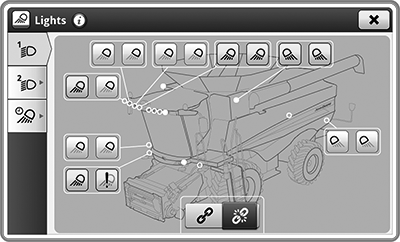
Lights application is used to access light presets that can be configured by the operator. Selecting one of the tab presets will allow you to make adjustments.
Field lights are configurable. Road lights are not configurable.

H114593-UN-11MAR16
Field Light Preset 1—Low Beam
Tabs available in Lights application:Field Lights Preset 1—Low Beam— lights that will illuminate in Preset 1—Low Beam mode.

H114596-UN-11MAR16
Field Lights Preset 2—Low Beam
Field Lights Preset 2—Low Beam— lights that will illuminate in Preset 2—Low Beam mode.

H114594-UN-11MAR16
Field Lights Preset 1—High Beam
Field Lights Preset 1—High Beam— lights that will illuminate in Preset 1—High Beam mode.

H114595-UN-11MAR16
Field Lights Preset 2—High Beam
Field Lights Preset 2—High Beam— lights that will illuminate in Preset 2—High Beam mode.

H114587-UN-11MAR16
Exit Lights
Exit Lights— select duration and lights which will remain illuminated after key switch is turned to OFF position.
H114597-UN-11MAR16
Highlighted Tab
Highlighted tabs— indicate which light preset is selected.Field Lights Controls— provide you with controls to select field lights on/off, high/low beams, and preset mode 1 or 2.

H113862-UN-11MAR16
Light With Fault
Light with Fault— exclamation point indicates light is in error. Example, light bulb is burnt out.|
SS43267,000080D-19-20170127 |