Navigation Bar
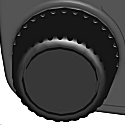
H117902-UN-29MAR16
Dial
Adjustment Dial— Turn the Adjustment Dial to increase or decrease selected input field. The button located in the center of the adjustment wheel is called the Close Button. Pressing this button closes pages on the CommandCenter™.CommandCenter is a trademark of Deere & Company

H117903-UN-29MAR16
Home Page Scroll
Home Page Scroll— press to scroll through custom Run Pages.

H117904-UN-19DEC16
Header
Header— press to open the Header Application.

H117905-UN-29MAR16
Harvest Settings
Harvest Settings— press to open the Harvest Settings Application.

H117906-UN-29MAR16

H117907-UN-29MAR16
Grain Handling
Grain Handling— press to open the Grain Handling Application.

H117908-UN-29MAR16
Residue Management
Residue Management— press to open the Residue Management Application.

H117909-UN-29MAR16
Folding
Folding— press to open the Folding Application.

H117910-UN-29MAR16
Work Monitor
Work Monitor— press to open the Work Monitor Application.

H117911-UN-29MAR16
Control Setup
Control Setup— press to open the Control Setup Application.

H117912-UN-29MAR16
HVAC
HVAC— press to open the HVAC Application.

H117913-UN-29MAR16
Lights
Lights— press to open the Lights Application.

H117914-UN-29MAR16
Audio
Audio— press to open the Audio Application.

H117915-UN-29MAR16
Phone
Phone— press to open the Phone Application.

H117916-UN-29MAR16
Video
Video— press to open the Video Application.|
SS43267,0000816-19-20170127 |