Cleaning Fan Speed Adjust
Increases or decreases cleaning fan speed.
Fan speed motor has a thermal (heat) shut off that stops the motor from working if any of the following happen:
- Switch is used continuously for more than two or three minutes.
- Adjustment system is against stop while the motor is still trying to change speed.
- Excessive binding or dragging in linkage.
If any of the above causes are suspected, clean and adjust as necessary.
Allow motor to cool 10 to 15 minutes before trying the switch again.

H117011-UN-29MAR16
Cleaning Fan Speed Adjust
Procedure to Modify:-
Engage the separator and run engine at high idle.
-
Press button on the armrest to activate the Armrest Adjustment Dial.
-
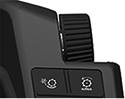
H115034-UN-28MAR16Armrest Adjustment Dial
Use the Armrest Adjustment Dial to select the desired speed.- Turn the dial clockwise to increase the value.
- Turn the dial counterclockwise to decrease the value.
Minimum and Maximum values may change if machine is equipped with a cleaning fan slow down Kit.
Minimum: 620 rpm
Maximum: 1350 rpm
Increment: 10 rpm
|
SS43267,0000831-19-20170127 |