Fan Speed
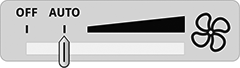
Fan Speed allows you to control fan speed inside the cab.
H114801-UN-17MAR16
Fan Speed
Procedure to Modify:-
Select the screen area under Fan Speed to modify it.
-

H114802-UN-17MAR16Indicator
Indicator moves to selected fan speed, automatic mode, or off by selecting the minus (-) or plus (+) buttons.-

H114998-UN-04JAN17Decrease
Select to decrease fan speed. -

H114997-UN-04JAN17Increase
Select to increase fan speed.
Fan will be turned OFF when indicator moves to OFF.
Fan speed will be automatically regulated when indicator moves to AUTO.
-
-

H114770-UN-04JAN17Close
Select to close fan speed setting.In AUTO mode, as temperature approaches setpoint, fan speed decreases.
Alternate Procedure to modify:
ClimaTrak™ Automatic Temperature Control—press fan speed increase or decrease buttons on armrest to modify fan speed.
|
ClimaTrak is a trademark of Deere & Company |
SS43267,00008A5-19-20170127 |