Advanced Settings | Adjustment Triggers | Auto Adjustment Step Size
Step Size is the amount of incremental change to either the chaffer, sieve, or fan speed when commanded by the Active Terrain Adjustment™ (ATA) system.
Modify When:
Adjust the step sizes if sensitivity adjustments or feature selections (individual component adjustment ON/OFF) are ineffective.
Increasing step size:
When maximum sensitivity setting is not achieving desired results, or when all but one component needs more adjustment than the others.
Decreasing step size:
When minimum sensitivity setting is not achieving desired results, or when all but one component needs less adjustment than the others.
Step sizes are individual increments not the total range of the adjustments or number of adjustments.

N118004-UN-22OCT15
Advanced Settings
Procedure to Modify:Chaffer and Sieve
-
Select Advanced Settings button.
-
Scroll to Adjustment Triggers.
-
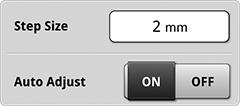
H119126-UN-05JAN17Step Size

H114645-UN-05JAN17Chaffer

H114646-UN-05JAN17Sieve
Select Step Size to open number pad and enter desired value.Minimum: 1 mm
Default: Based on crop being harvested.
Maximum: 3 mm
Increment: 1 mm
-

H114674-UN-03JAN17Close
Select to close.
N118004-UN-22OCT15
Advanced Settings
Fan Speed-
Select Advanced Settings button.
-
Scroll to Adjustment Triggers.
-

H119128-UN-05JAN17Step Size
Select to open Step Size page. -

H118542-UN-05JAN17Step Size

H114644-UN-05JAN17Fan Speed
Select desired value.Minimum: 20 rpm
Default: Based on crop being harvested.
Maximum: 50 rpm
Increment: 10 rpm
-
H114674-UN-03JAN17Close
Select to close.
|
Active Terrain Adjustment is a trademark of Deere & Company |
SS43267,00008B0-19-20170127 |