Controls Setup Overview
H119897-UN-20JAN17
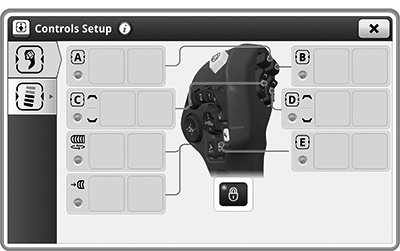
Controls Setup
Underscored text identifies that additional information is available within this section or another section of this publication.Main page shown is for example only. Your main page may differ depending on options or connected equipment.
Controls Setup application is used to make new assignments or access custom presets that you previously configured on the Multi-Function Lever or the CommandARM™ .
Controls Setup contains no default assignments; the Multi-Function Lever and CommandARM™ reset to a locked state upon key cycle.
Display must be booted in order for you to disengage the Control Group locks for function assignment. Control Group refers to the reconfigurable buttons on both the Multi-Function Lever and CommandARM™.

H118141-UN-20JAN17
Multi-Function Lever Tab
Alignment Tabs Available in the Controls Setup Application:Multi-Function Lever— select to access the Multi-Function Lever presets.

H118139-UN-20JAN17
CommandARM™ Tab
CommandARM™— select to access the CommandARM™ presets.

H118169-UN-20JAN17
Highlighted Tab
Highlighted tab— indicates which preset is selected.The on-screen Lock Indicator is illuminated whenever the displayed control group is locked with the Control Group Lock button on the CommandARM™. Applications or Functions setup will not operate.

H118140-UN-20JAN17
Lock Indicator
Lock Indicator— illuminates to indicate that the Control Group Lock button is locked.

H116648-UN-19DEC16
Close
Select to close the Controls Setup application.|
CommandARM is a trademark of Deere & Company |
SS43267,000090E-19-20170119 |