ICA is finding recommendations.
"ICA is finding recommendations." activates ICA, begins a session, displays the current selected settings, and displays the Finding Recommendations progress indicator.

H116582-UN-30JAN17
Edit Issues
Items Accessible on "ICA is finding recommendations." Page:Edit Issues— allows you to begin a new session and change the reported issues or return to the previous page.
H116308-UN-25JAN17
Current Settings
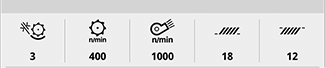
Current Settings— communicates the current settings of threshing clearance, threshing speed, cleaning fan speed, chaffer clearance, and sieve clearance.

H113801-UN-04JAN17
Progress Indicator
Finding Recommendations— displays the progress indicator while the system is searching for recommended solutions.

H116292-UN-30JAN17
Stop Session
Stop Session— ends the session, clears the issue list, and returns to the "Select areas to improve" display.Stop Session is the best method to close the application without resolving all issues and starting over if you re-open the application. Adjustments that were made by ICA will not be undone if Stop Session is chosen to close the system.
Stop session is only available if you are reporting new issues in the middle of an ICA session.
After ICA finds the recommendations, you will be taken to the Select "Apply" to have ICA adjust settings using the shown solution.

H116310-UN-30JAN17
Close
Select to close the ICA application.ICA will resume in the same place when you re-enter after closing.
|
SS43267,000092D-19-20170526 |