Recommended Solutions
Recommended Solutions allows you to a see complete list of suggested solutions and specifics about the intended adjustment.

H116622-UN-25JAN17
Recommended Solutions
Items Accessible on "Solution Display":Recommended Solutions— allows access to list of suggested solutions.

H116623-UN-25JAN17
Left

H116624-UN-25JAN17
Right
Left and Right controls— allows you to scroll through the complete list of suggested solutions, showing adjustment specifics.

H118281-UN-25JAN17
Recommended Solutions
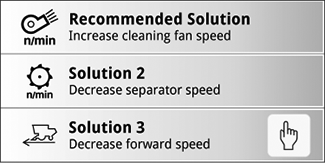
Select to view the entire list of recommended solutions.Selecting Recommended Solutions opens a list of Interactive Combine Adjustment (ICA) solutions.

H118284-UN-30JAN17
Scroll Up
Select to scroll up the recommended solutions list.

H118282-UN-30JAN17
Scroll Down
Select to scroll down the recommended solutions list.
H116625-UN-30JAN17
Select Solution
Solutions that require you to manually adjust settings, or climb out of the cab, have a slightly different appearance within the Solutions multi-pane toggle view. These solutions are indicated by a "hand icon", "Manual" or "Out of Cab" wording on the screen. These types of adjustments replace the "Apply" button with a "Next" button, indicating there may be more actions required.For out-of-cab manual adjustments, refer to the machine Operator's Manual.
|
SS43267,0000932-19-20170124 |