Integrated Combine Adjustment 2 Main Page
H120315-UN-30JAN17
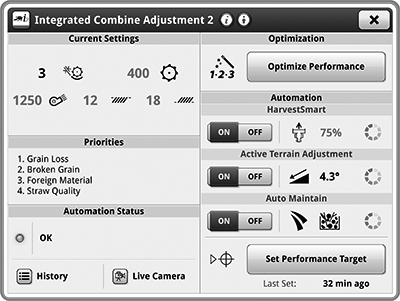
Integrated Combine Adjustment 2
Underscored text identifies that additional information is available within this section or another section of this publication.Main page shown is for example only. Your main page may differ depending on options or connected equipment.
Integrated Combine Adjustment 2 (ICA2) application actively maintains a performance target.
- Use Harvest Settings for the initial machine settings for the selected crop.
- Use Optimize Performance to optimize machine settings.
- Use ICA2 to maintain and monitor machine performance using live view cameras located on the clean grain elevator and tailings elevator.

H119182-UN-30JAN17
Current Settings
Items Accessible on Integrated Combine Adjustment 2 Main Page:Current Settings— select Current Settings screen area to access Harvest Settings Application.
H119183-UN-30JAN17
Priorities
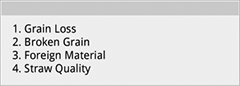
Priorities— allows you to arrange the priority list in the order of their importance with the highest priority at the top.

H119779-UN-30JAN17
Automation Status
Automation Status— allows you to view ICA2 Diagnostics.

H113739-UN-30JAN17
History
History— allows you to view history of current and previous ICA2 adjustments.

H113740-UN-30JAN17
Live Camera
Live Camera— allows you to view the clean grain and tailings elevator camera feeds.

H119185-UN-30JAN17
Optimization
Optimize Performance— takes to you to the Interactive Combine Adjustment application.

H119775-UN-30JAN17
HarvestSmart™
HarvestSmart™HarvestSmart™— varies ground speed to maintain a constant flow of material through the machine. Select screen area to access HarvestSmart™ settings.

H116937-UN-30JAN17
ON/OFF
Automation— allows you to enable or disable HarvestSmart™.

H119773-UN-30JAN17
Active Terrain Adjustment™
Active Terrain Adjustment™Active Terrain Adjustment™ (ATA)— allows cleaning fan, chaffer, and sieve to adjust automatically depending on the crop type and machine pitch when harvesting in uphill or downhill terrain. Select screen area to access ATA settings.
H116937-UN-30JAN17
ON/OFF
Automation— allows you to enable or disable Active Terrain Adjustment™.

H119774-UN-30JAN17
Auto Maintain
Auto MaintainAuto Maintain— allows you to set the Response Aggressiveness and sensitivity levels for Grain Loss, Broken Grain, and Foreign Material. Select screen area to access Auto Maintain settings.
H116937-UN-30JAN17
ON/OFF
Automation— allows you to enable or disable Auto Maintain.

H119195-UN-30JAN17
Set Performance Target
Set Performance Target— allows you to set a new performance target at existing loss, grain quality, and feedrate levels.When an optimization (ICA) process is in session, Auto Maintain Set Performance Target is unavailable, and Return to Optimize becomes available.

H119887-UN-30JAN17
Return to Optimize
Return to Optimize— allows you to return to the Interactive Combine Adjustment.
H119190-UN-30JAN17
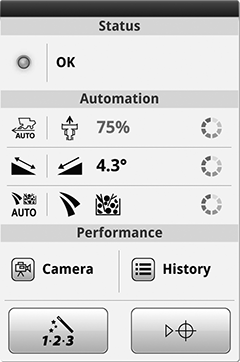
ICA2 Summary
Run Page Modules:Modules for this application can be added to run pages using Layout Manager.
ICA2 Summary— shows Automation Status, each systems state, and links to Camera, History, Optimize Performance, and Set Performance Target.
Different modules can be available for your application.

H113748-UN-30JAN17
Shortcut Key
Shortcut Keys:Shortcut keys for this application can be added to shortcut bar using Layout Manager.
ICA2 Shortcut Key— quick access to open the ICA2 application.
Different shortcut keys can be available for your application.
|
HarvestSmart is a trademark of Deere & Company Active Terrain Adjustment is a trademark of Deere & Company |
SS43267,0000942-19-20170519 |