Load Harvest Settings | Preset
Preset allows you to select from a list of saved machine configurations for a given crop.
Modify When:
Modify or create your own preset to capture the harvest settings that provide the desired performance and grain quality for the crop and conditions that you are harvesting.

H116974-UN-27JAN17
Load Harvest Settings
Procedure to Modify:-
Select to open.
Other than corn, all other crop types are listed with default first, then clean out option, and finally, all of your created presets in alphabetical order.
-
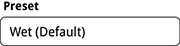
H118081-UN-27JAN17Preset
Select to open Select Preset. -

H119178-UN-27JAN17Select Preset
Select desired preset. -

H116106-UN-27JAN17OK
Select to save preset and return to Load Harvest Settings.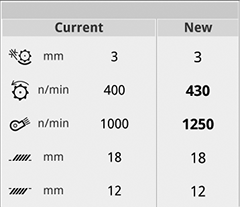
H116110-UN-27JAN17Current / New
As you select a different preset, the "New" column of Settings Preview updates to display the settings change in bold.When presets for defaults are changed, the "New" column value in the Settings Preview changes. Defaults remain unchanged when changing presets within the crop type.
When modifications are made to the selected preset, the word (Modified) is added to the name.
H116974-UN-27JAN17
Load Harvest Settings
Procedure to Delete:-
Select to open.
-
H118081-UN-27JAN17Preset
Select to open Select Preset. -
H119178-UN-27JAN17Select Preset
Select desired preset. -

H116104-UN-27JAN17Delete
Select to delete Preset.Presets that you created can be deleted. If pressed, a message dialogue is shown to confirm the delete action on the preset.
-

H116105-UN-27JAN17Cancel
Select to cancel if you do not wish to delete the selected preset. -
H116106-UN-27JAN17OK
Manually record data by hand before deleting. If you delete a preset, it is removed from the display and cannot be undone.Select to delete the preset.
|
SS43267,0000964-19-20170203 |