Settings | Operating Mode | Smart Mode | Smart Target
Smart Target allows you to set VisionTrak™ loss and HarvestSmart™ targets at the same time.
While in Smart Mode, target pressure controls are unavailable. You are able to set the target by tapping the Set Target button.
Procedure to Modify:
HarvestSmart™ maintains your speed when exiting the field and unloading on the go, until you move the multi-function lever to gain control of the machine. When you have control of machine speed, continue to monitor power and adjust speed as needed so the engine does not stall.
Set Target procedure should be completed in each new field.
-
Move the multi-function lever to gain control of the machine.
-
Operate machine at preferred harvest speed and grain loss level.
-

H118561-UN-20JAN17Set Target
Select to Set Target if current grain loss is acceptable. -
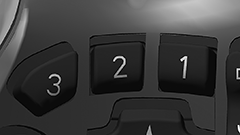
H118557-UN-20JAN17Activation Buttons
To activate HarvestSmart™, press the 3 or 2 button on the multi-function lever.Machine makes speed adjustments automatically during target acquisition.
-

H118559-UN-20JAN17Close
Select to close.
|
VisionTrak is a trademark of Deere & Company HarvestSmart is a trademark of Deere & Company |
SS43267,0000986-19-20170516 |