Settings | Operating Mode | Capacity Mode | Target Pressure
Target Pressure allows the machine to maintain a consistent load on the separator.
- Adjusting the Target Pressure higher causes the machine to increase speed.
- Adjusting the Target Pressure lower causes the machine to decrease speed.
Target Pressure cannot be adjusted through the HarvestSmart™ setup screen while in Smart Mode.
Procedure to Modify Automatically:
HarvestSmart™ maintains your speed when exiting the field and unloading on the go, until you move the multi-function lever to gain control of the machine.
Set Target procedure should be completed in each new field.
-
Move the multi-function lever to gain control of the machine.
-
Operate machine at preferred harvest speed and grain loss level.
-

H118561-UN-20JAN17Set Target
Select to Set Target if current grain loss is acceptable. -

H118557-UN-20JAN17Activation Buttons
To activate HarvestSmart™, press the 3 or 2 button on the multi-function lever.Machine makes speed adjustments automatically during target acquisition.
-

H118559-UN-20JAN17Close
Select to close.

H118563-UN-20JAN17
Target Pressure
Procedure to Modify Manually:-
Select plus (+) to increase or minus (-) to decrease desired pressure.
When you adjust Target Pressure, the setting starts at current pressure and can be adjusted up or down from there.
Minimum— 0%
Maximum— 100%
Increments— 0.5%
-
H118559-UN-20JAN17Close
Select to close.

H118564-UN-20JAN17
Target Pressure
Alternative Procedure to Modify Manually:-
Select to activate Armrest Adjustment Dial.
-
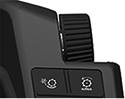
H115034-UN-28MAR16Armrest Adjustment Dial
Use Armrest Adjustment Dial to select desired setting.- Turn dial clockwise to increase value.
- Turn dial counterclockwise to decrease value.
Minimum— 0%
Maximum— 100%
Increments— 0.5%
|
HarvestSmart is a trademark of Deere & Company |
SS43267,0000987-19-20170516 |