AM, FM, Weather Channel Home Page
RXA0150912-UN-08JAN16
AM, FM, Weather Channel Home Page
Refer to Select Radio Source with Generation 4 CommandCenter™ in this section of this Operator’s Manual, to learn how to navigate to AM, FM, Weather Channel home page.
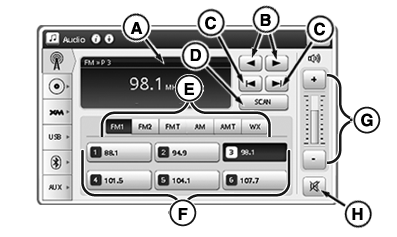
A—Display Area: Displays current radio activity/information.
B—Manually Tune Forward/Back: Use left or right button to manually tune in desired station. Each time button is pressed, radio frequency increases or decreases by standard increment.
C—Next/Previous Station: Select to seek next available station before or after current station.
D—Scan Button: Select to cycle through available stations. Each station broadcasts for 5 seconds before moving to next station. Cycle will end if returns to original station or by selecting button again.
E—AM/FM/Weather Button Bar: Cycle through channel presets using toggle bar (FM1, FM2, FMT, AM, AMT, WX).
F—Presets: Six presets can be programmed to FM1, FM2, FMT, AM and AMT banks. To change presets, press preset for 3 seconds, while on desired station, until “beep” sounds. Press again to tune radio to saved station. Six presets are pre-programed into WX bank and cannot be changed. FMT and AMT banks can be set automatically using T-STORE function. For more information, see Use Premium Radio in this section of this Operator’s Manual.
G—Volume Adjustment: Adjust volume.
H—Mute: Silence sound.
|
CommandCenter is a trademark of Deere & Company |
TO84419,0000087-19-20160111 |