Premium Radio XM Home Page
RXA0132502-UN-28JUN13
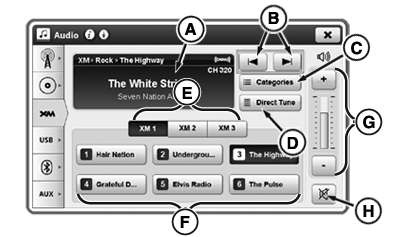
XM Home Page
Refer to Select Radio Source with Generation 4 CommandCenter™ in this section of this Operator’s Manual, to learn how to navigate to XM home page.
A—Display Area: Displays XM activity/information.
B—Next/Previous Station: Select to seek next available station before or after current station.
C—(CAT) Category Mode: Select to launch category search mode. Scroll up or down through categories and select station within category.
D—Direct Tune: Select to enter desired channel with keypad.
E—XM Channel Bank: Toggle through banks using buttons (XM1, XM2, XM3).
F—Presets: Six presets can be programmed per bank. To set, press and hold desired preset for at least three seconds.
G—Volume Adjustment: Adjust volume.
H—Mute: Silence sound.
|
CommandCenter is a trademark of Deere & Company |
TO84419,0000089-19-20151009 |