Regional Settings, Time/Date Settings, Units of Measurement
H86938-UN-20NOV06
H86231-UN-10JAN07
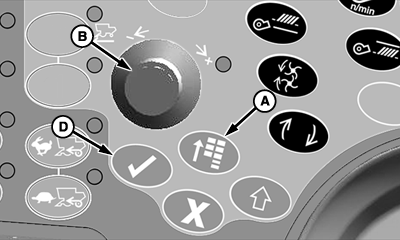
A - Main Menu Switch
B - Selection Dial
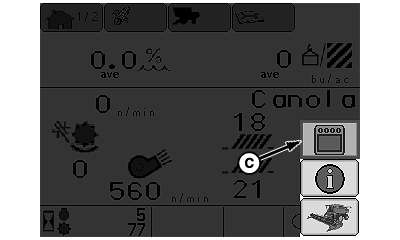
C - Display Settings Icon
D - Confirm Switch
Regional Settings:Press main menu switch (A) and rotate selection dial (B) until display settings icon (C) is highlighted.
Press confirm switch (D).
H86234-UN-07MAR07
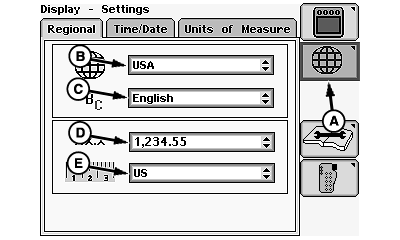
A - Settings Icon
B - Country Menu
C - Language Menu
D - Numeric Format Menu
E - Global Units Menu
Rotate selection dial until settings icon (A) is highlighted and press confirm switch.Rotate selection dial to select:
- Country Menu (B)
- Language Menu (C)
- Numeric Menu (D)
- Global Unit Menu (E)
Press confirm switch once desired menu is highlighted.
Menu will appear with choices for that highlighted menu.
Rotate selection dial until desired choice is highlighted and press confirm switch.
H86235-UN-07MAR07
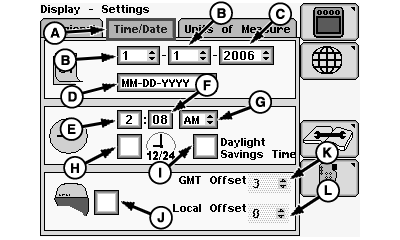
A - Time/Date Menu
B - Month/Day
C - Year
D - Date Format
E - Hour
F - Minute
G - A.M. or P.M.
H - Military Time or Standard Time Box
I - Daylight Savings Time
J - Position Receiver
K - Greenwich Time Offset
L - Local Time Offset
Time and Date Settings:Rotate selection dial until time/date menu (A) is highlighted and press confirm switch.
Rotate selection dial to select:
- Month/Day (B)
- Year (C)
- Date Format (D)
- Hour (E)
- Minute (F)
- A.M. or P.M. (G)
Press confirm switch once desired menu is highlighted.
Menu will appear with choices for that highlighted menu.
Rotate selection dial until desired choice is highlighted and press confirm switch.
Rotate selection dial to select:
- Military Time or Standard Time Box (H)
- Daylight Savings Time (I)
NOTE: Press confirm switch until box is checked. Time will show in military time. Press confirm switch again for standard time.
Determine which time is to be displayed and press confirm switch once to check box.
NOTE: The following items only displays if a StarFire™ Position Receiver is attached.
Rotate selection dial to select:
- Position Receiver (J)
- Greenwich Mean Time Offset (K)
- Local Time Offset (L)
NOTE: Press confirm switch until position receiver box is checked. Time now can be set to two different time offsets.
Determine which time offset will be used and rotate selection dial until highlighted.
Press confirm switch once desired menu is highlighted.
H86237-UN-07MAR07
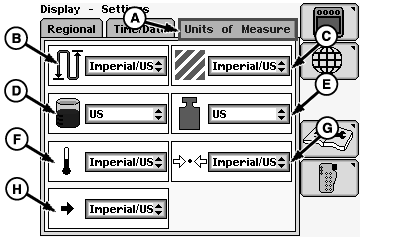
A - Units of Measure Menu
B - Distance
C - Area
D - Volume
E - Mass
F - Temperature
G - Pressure
H - Force
Units of Measurement (Metric, Imperial, US)NOTE: Unit of Measurement choices will override specific Global Units previously selected and allows “mixed” units (English and Metric) where supported.
Rotate selection dial until units of measure menu (A) is highlighted and press confirm switch.
Rotate selection dial to select:
- Distance (B)
- Area (C)
- Volume (D)
- Mass (E)
- Temperature (F)
- Pressure (G)
- Force (H)
Press confirm switch once desired menu is highlighted.
Menu will appear with choices for that highlighted menu.
Rotate selection dial until desired choice is highlighted and press confirm switch.
H86938-UN-20NOV06
H86236-UN-10JAN07
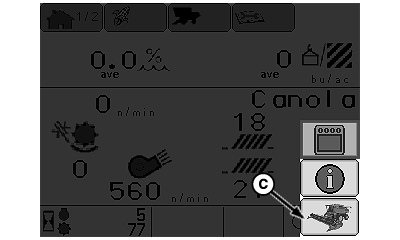
A - Main Menu Switch
B - Selection Dial
C - Combine Main Page Icon
D - Confirm Switch
Press main menu switch (A) and rotate selection dial (B) until combine main page icon (C) is highlighted.Press confirm switch (D).
CommandCenter display home page will appear.
StarFire is a trademark of Deere & Company | OUO6075,000004B-19-20080319 |