Park Brake Switch (Orange) (ProDrive Machines)
NOTE: When first started, system is in manual mode with indicator light ON indicating park brake is engaged. Press park brake switch once to enter automatic mode.
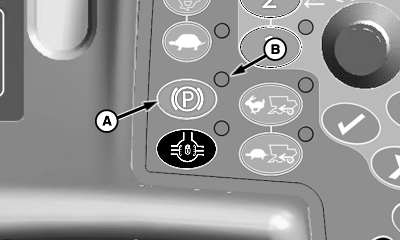
H90261-UN-08NOV07
A - Park Brake Switch
B - Indicator Light
Park brake switch (A) manually or automatically engages/disengages parking brake preventing machine movement.- Press park brake switch once to set park brake to automatic mode. Indicator light (B) comes ON and flashes.
- If multifunction control handle is in neutral gate and speed is less than 3 km/h (1.9 mph), park brakes are applied. If multifunction control handle is moved out of neutral gate, park brakes are released.
Automatic Mode:
- Press park brake switch twice to set park brake to manual mode. Indicator light (B) comes ON.
- If multifunction control handle is in neutral gate and speed is less than 3 km/h (1.9 mph), park brakes are applied. If multifunction control handle is moved out of neutral gate or speed is greater than 3 km/h (1.9 mph) an alarm sounds.
Manual Engagement (Default Mode):
OUO6075,000005C-19-20080423 |