Clear Distance Area Counter or Weight and Moisture Counter
H91198-UN-21APR08
H87092-UN-15DEC06
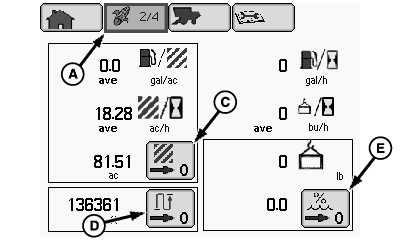
A - Harvesting Information Icon
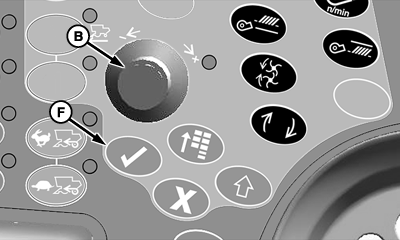
B - Selection Dial
C - Area Counter Reset Box
D - Distance Counter Reset Box
E - Weight and Moisture Counter Reset Box
F - Confirm Switch
From harvesting information icon (A), rotate selection dial (B) until desired counter reset box is highlighted:- Area Counter Reset Box (C)
- Distance Counter Reset Box (D)
- Weight and Moisture Counter Reset Box (E)
Press confirm switch (F) to reset highlighted box to zero.
- NOTE: Clearing distance and area numbers on this page will not clear Farm, Field, Crop Totals on next page. Only these counters will be cleared.
Distance and Area Counter - shows total distance traveled and area since being reset. - NOTE: Clearing weight and moisture numbers on this page will not clear Farm, Field, Crop Totals on next page. Only these counters will be cleared.
Weight and Moisture Counter - shows weight and moisture numbers since being reset.
OUO6075,00000BD-19-20080421 |