Manual Adjust Yield Calibration Factor
NOTE: Do not perform a manual adjust Calibration Factor if you intend on using the Low Flow calibration.
H81234-UN-17JUN04
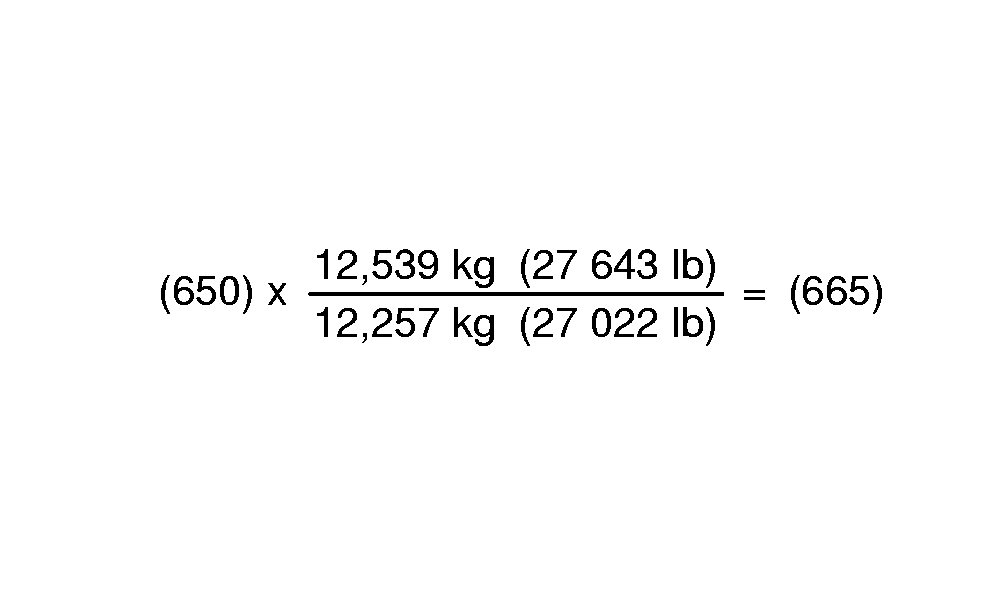
Displayed Calibration Factor = 650
Weight of grain shown on display = 12,539 kg (27,643 lb.)
Net weight of grain from scale ticket = 12,257 kg (27,022 lb.)
New Calibration Factor = 665
H91995-UN-30MAY08
H91996-UN-29MAY08
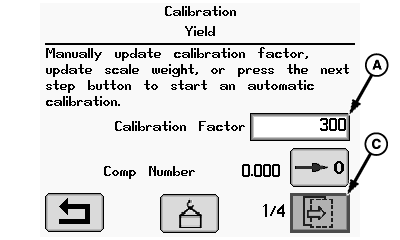
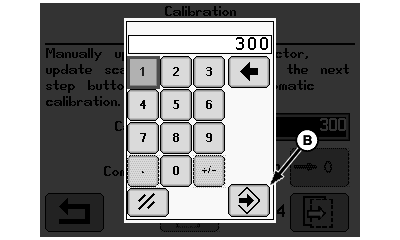
A - Calibration Factor Box
B - Enter/Accept Icon
C - Next Page Icon
Rotate selection dial until calibration factor box (A) is highlighted and press confirm switch.Using numeric display, rotate selection dial until desired digits are highlighted and press confirm switch.
NOTE: Repeat procedure until calibration factor value is shown.
Rotate selection dial until enter icon (B) is highlighted and press confirm switch.
Rotate selection dial until next page icon (C) is highlighted and press confirm switch to follow instructions shown on remaining screens.
OUO6075,0000156-19-20080602 |