Yield Calibration
IMPORTANT:
H91901-UN-29MAY08
H86977-UN-20NOV06
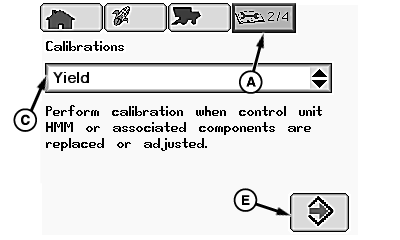
A - Diagnostics and Calibration Icon
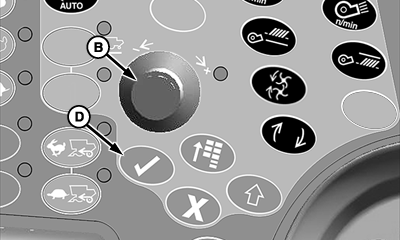
B - Selection Dial
C - Calibrations Menu
D - Confirm Switch
E - Enter/Accept Icon
Mass flow sensor must be calibrated every year to achieve accurate grain weight measurements.Standard calibration must be performed in every crop that is harvested.
Low Flow calibration must be performed to obtain improved levels of accuracy in situations where large variations in grain flow rates occur.
From diagnostics and calibration icon (A), rotate selection dial (B) until calibrations menu (C) is highlighted.
Press confirm switch (D) and rotate selection dial until Yield is highlighted.
Press confirm switch and rotate selection dial until enter icon (E) is highlighted.
Press confirm switch to advance to next page.
NOTE:
H92006-UN-30MAY08
H92005-UN-30MAY08
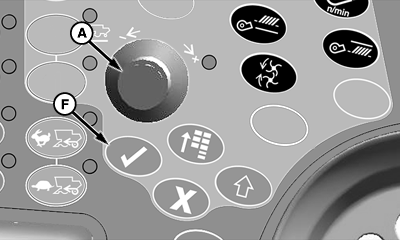
A - Selection Dial
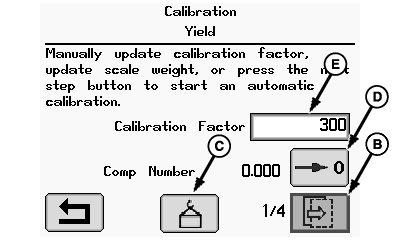
B - Next Page Icon
C - Weight Icon
D - Comp Number Rest Box
E - Calibration Factor
F - Confirm Switch
Operator must perform the standard calibration before the low flow calibration.For the initial calibration, weight icon and comp number rest box are not enabled.
Rotate selection dial (A) until one of the following icons is highlighted:
- Next Page Icon (B) - allows operator to advance to next page of calibration.
- Weight Icon (C) - allows operator to enter scale weight in calibration factor once scale weight is known from elevator.
- Comp Number Reset Box (D) - allows operator to reset the low flow calibration.
- NOTE: For information on Calibration Factor, refer to Manual Adjust Calibration Factor later in this section.
Calibration Factor (E) - allows operator to input a calibration factor number that was figured using a formula.
Press confirm switch (F) once desired selection is highlighted.
H92009-UN-30MAY08
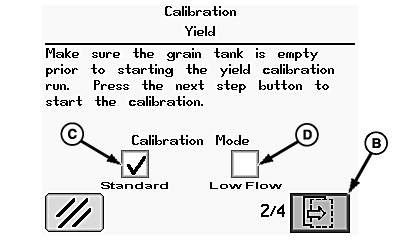
H92008-UN-30MAY08
A - Selection Dial
B - Next Page Icon
C - Standard Calibration Mode Box
D - Low Flow Calibration Mode Box
E - Confirm Switch
Rotate selection dial (A) until one of the following icons is highlighted:NOTE: For the initial calibration, standard box and low flow box are not enabled.
- Next Page Icon (B) - allows operator to advance to next page of calibration.
- Standard Calibration Mode Box (C) - allows operator perform a calibration in every crop that is harvested.
- Low Flow Calibration Mode Box (D) - allows operator to perform a calibration to obtain an improved level of accuracy in situations where there are large variations in grain flow rate.
Press confirm switch (E) once desired selection is highlighted.
Standard Calibration Mode
NOTE:
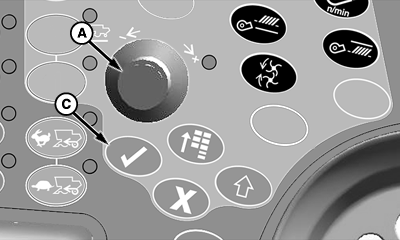
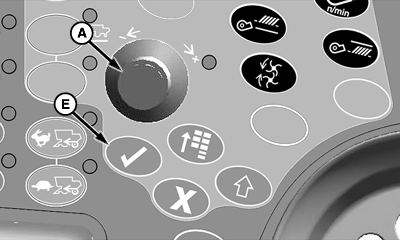
H92010-UN-30MAY08
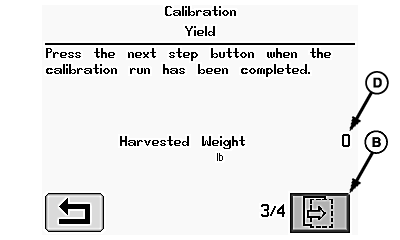
H92011-UN-30MAY08
A - Selection Dial
B - Next Page Icon
C - Confirm Switch
D - Harvested Weight
Harvested weight (D) is the approximate weight of grain that was calibrated during the calibration process.Rotate selection dial (A) until next page icon (B) is highlighted and press confirm switch (C).
Low Flow Calibration Mode
NOTE:
H92010-UN-30MAY08
H93312-UN-23JAN09
A - Selection Dial
B - Next Page Icon
C - Confirm Switch
D - Harvested Weight
E - Instantaneous Flow Rate
F - Standard Calibration Point
G - Average Flow Rate
H - Range Area
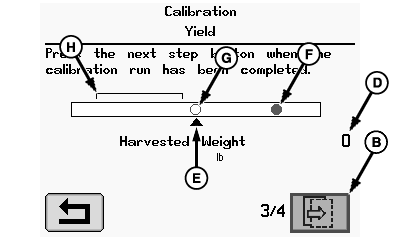
Harvested weight (D) is the approximate weight of grain that was calibrated during the calibration process.- Instantaneous Flow Rate (E) - arrow below bar graph indicates instantaneous flow rate.
- Standard Calibration Point (F) - green dot indicates standard calibration point (will be a red if a scale weight for standard calibration has not yet been entered).
- Average Flow Rate (G) - red circle indicates average flow rate during low flow calibration.NOTE: When calibrated correctly, red circle should end up towards left side of bar graph within range area (H).
Rotate selection dial (A) until next page icon (B) is highlighted and press confirm switch (C).
H92010-UN-30MAY08
H92012-UN-05JUN08
H91903-UN-29MAY08
A - Selection Dial
B - Enter/Accept Icon
C - Confirm Switch
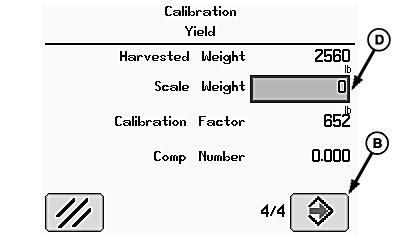
D - Scale Weight
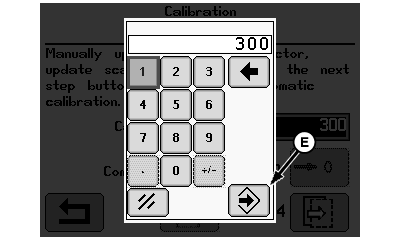
E - Enter/Accept Icon
Scale Weight Not Known: Rotate selection dial (A) until enter icon (B) is highlighted and press confirm switch (C).NOTE: Scale weight can be entered after a calibration is complete (during calibration this indicates approximate weight of grain that has been harvested).
- Rotate selection dial until scale weight box (D) is highlighted and press confirm switch.
- Using numeric display, rotate selection dial until desired digits are highlighted and press confirm switch.NOTE: Repeat procedure until scale weight value is shown.
- Rotate selection dial until enter icon (E) is highlighted and press confirm switch to return to calibration menu.
- Rotate selection dial until enter icon (B) is highlighted and press confirm switch (C).
Scale Weight Known:
Scale Weight Returns From Elevator
H91997-UN-30MAY08
H91998-UN-29MAY08
H91999-UN-29MAY08
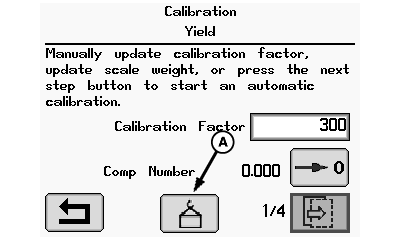
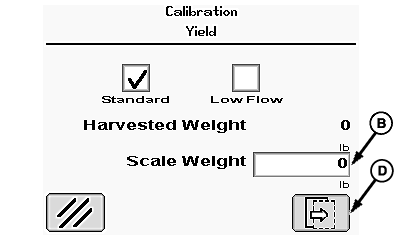
A - Weight Icon
B - Scale Weight Box
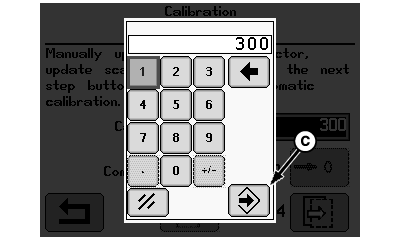
C - Enter/Accept Icon
D - Next Page Icon
Rotate selection dial until weight icon (A) is highlighted and press confirm switch.Rotate selection dial until scale weight box (B) is highlighted and press confirm switch.
Using numeric display, rotate selection dial until desired digits are highlighted and press confirm switch.
NOTE: Repeat procedure until scale weight value is shown.
Rotate selection dial until enter icon (C) is highlighted and press confirm switch to return to calibration menu.
Rotate selection dial until next page icon (D) is highlighted and press confirm switch to follow instructions shown on remaining screens.
OUO6075,00002B9-19-20090306 |