Float Position Adjust Switch (Black)
NOTE:
H86964-UN-20NOV06
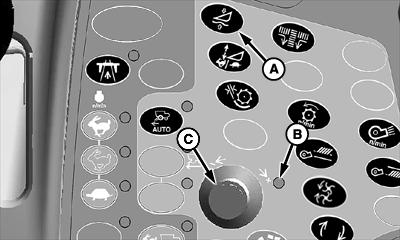
A - Float Position Adjust Switch
B - Indicator Light
C - Selection Dial
Switch only works on 600D Drapers.Header Height Sensing (off the ground) must be enabled to adjust float position. This is not available with Header Height Sensing (on the ground).
Header Height Sensing must not be enabled to adjust float pressure.
Float position adjust switch (A) controls the amount of pressure in the gauge wheel and float frame cylinders as determined by operator.
Press float position adjust switch.
Indicator light (B) will come on indicating setting can be adjusted.
Turn selection dial (C) towards plus (+) symbol to increase gauge wheel and float frame cylinders pressure and setpoint or towards minus (-) symbol to decrease gauge wheel and float frame cylinders setpoint.
- Values are adjustable from 1 to 10 with a default of 5.
- Level land machines should have a setting of 3 or lower.
- Contour-Master machines should start with a setting of 5.NOTE: Value should be set lower for issues where cut height is not remaining level (left to right). Steeper slopes should have a lower value.
CommandCenter display will show operator adjustment setting.
OUO6075,0000506-19-20100112 |