Sieve Adjust Switch (Optional) (Black)
H86958-UN-20NOV06
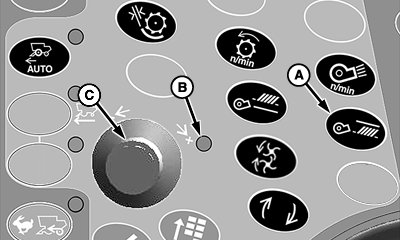
A - Sieve Adjust Switch
B - Indicator Light
C - Selection Dial
Sieve adjust switch (A) allows operator to adjust sieve clearance from inside cab as determined by operator.Press sieve adjust switch.
Indicator light (B) will come on indicating setting can be adjusted.
Turn selection dial (C) towards plus (+) symbol to increase sieve clearance or towards minus (-) symbol to decrease sieve clearance.
CommandCenter display will show operator adjustment setting.
OUO6075,00005F0-19-20070330 |