Clear Field Totals/Print Field Totals
NOTE: The following will appear on GreenStar display (if equipped) instead of on CommandCenter.
If machine is not equipped with moisture sensor, only the following Field Totals information will appear:
- Area
- Harvest Time
- Productivity
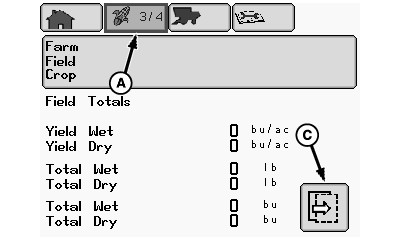
H86341-UN-10JAN07
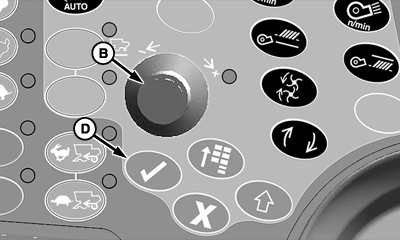
H86933-UN-20NOV06
A - Harvesting Information Icon
B - Selection Dial
C - Next Page Icon
D - Confirm Switch
From harvesting information icon (A), rotate selection dial (B) until next page icon (C) is highlighted.Press confirm switch (D) to advance to next page.
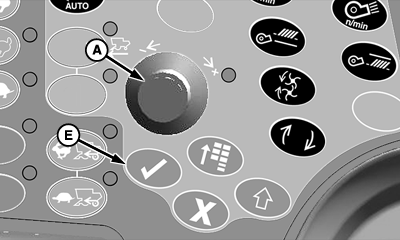
H86936-UN-20NOV06
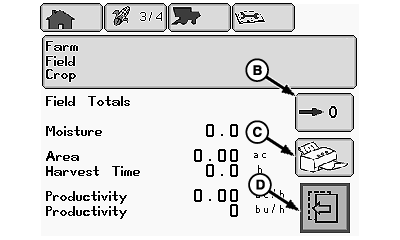
H86344-UN-10JAN07
A - Selection Dial
B - Field Totals Reset Box
C - Printer Icon (Export Only)
D - Previous Page Icon
E - Confirm Switch
Rotate selection dial (A) until one of the following icons is highlighted:- Field Totals Reset Box (B) - deletes field totals for the selected farm/field/crop.
- NOTE: On export machines a printer can be integrated in the overhead display that allows farm, field and crop totals to be printed.
Printer Icon (C) - allows operator to print data shown on screen. - Previous Page Icon (D) - allows operator to view previous page.
Press confirm switch (E) once desired icon is highlighted.
OUO6075,00009C5-19-20070713 |