Message Center
H86938-UN-20NOV06
H86257-UN-10JAN07
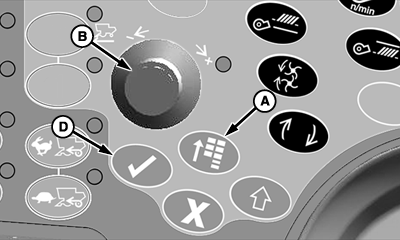
A - Main Menu Switch
B - Selection Dial
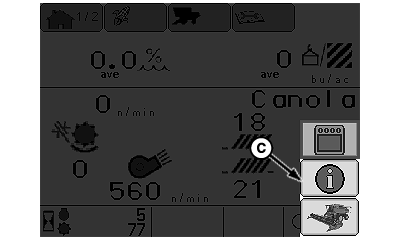
C - Message Center Icon
D - Confirm Switch
Press main menu switch (A) and rotate selection dial (B) until message center icon (C) is highlighted.Press confirm switch (D).
H87031-UN-10JAN07
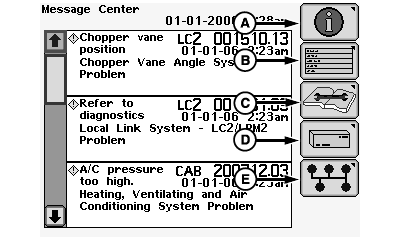
A - Message Center Icon
B - Diagnostic Address Icon
C - Diagnostic Trouble Codes Icon
D - Electronic Control Unit Information Icon
E - CAN Bus Information Icon
Message Center:Rotate selection dial until message center icon (A) is highlighted and press confirm switch.
Screen displays messages to operator if any are available.
Diagnostic Address:
NOTE: If equipped with optional GreenStar display, do not attempt to access diagnostic address information on both displays at the same time.
Rotate selection dial until diagnostic address icon (B) is highlighted and press confirm switch.
Screen allows operator to select a desired controller and make address modifications/changes or view addresses (see your John Deere Dealer).
Diagnostic Trouble Codes:
NOTE: If equipped with optional GreenStar display, do not attempt to access diagnostic trouble codes on both displays at the same time.
Rotate selection dial until diagnostic trouble codes icon (C) is highlighted and press confirm switch.
Screen allows operator to view controllers, trouble code addresses, code (active or not), and counts how many times code is displayed (refer Diagnostic Trouble Codes Menu in Diagnostic Trouble Codes Section for further information.
Electronic Control Unit Information:
Rotate selection dial until electronic control unit information icon (D) is highlighted and press confirm switch.
Screen allows operator to view control units, addresses, message counts, controller part numbers and serial numbers, software part numbers and versions (see your John Deere Dealer).
CAN Bus Information:
Rotate selection dial until CAN bus information icon (E) is highlighted and press confirm switch.
Screen allows operator to view if network status is active or not active, total message counts, and CAN high or low voltages (see your John Deere Dealer).
H86938-UN-20NOV06
H86236-UN-10JAN07
A - Main Menu Switch
B - Selection Dial
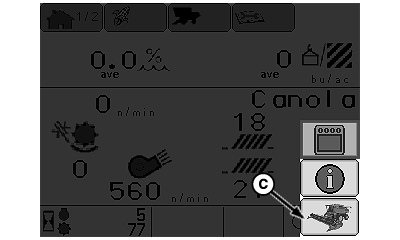
C - Combine Main Page Icon
D - Confirm Switch
Press main menu switch (A) and rotate selection dial (B) until combine main page icon (C) is highlighted.Press confirm switch (D) to return to home page.
OUO6075,00009CA-19-20071213 |