Choose Existing Farm/Field or Name New Farm/Field
H87299-UN-26JAN07
H87353-UN-05FEB07
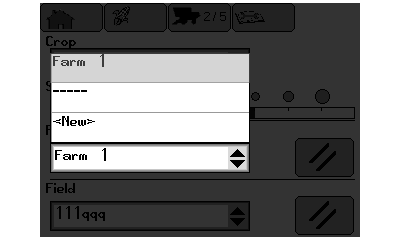
New Farm/Field Menu
H86933-UN-20NOV06
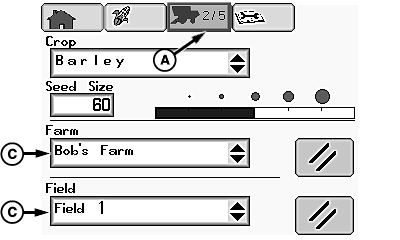
A - Setup Pages Icon
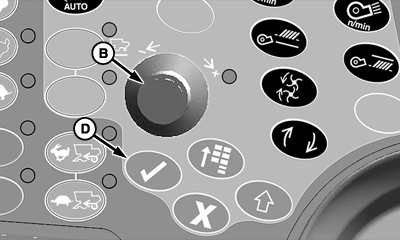
B - Selection Dial
C - Farm or Field Menu
D - Confirm Switch
From setup pages icon (A), rotate selection dial (B) until farm or field menu (C) is highlighted.Press confirm switch (D) for farm or field listings.
Rotate selection dial to choose an existing farm or field, or select “New” to enter a new farm or field.
Once desired selection is highlighted, press confirm switch.
NOTE:
H87396-UN-13FEB07
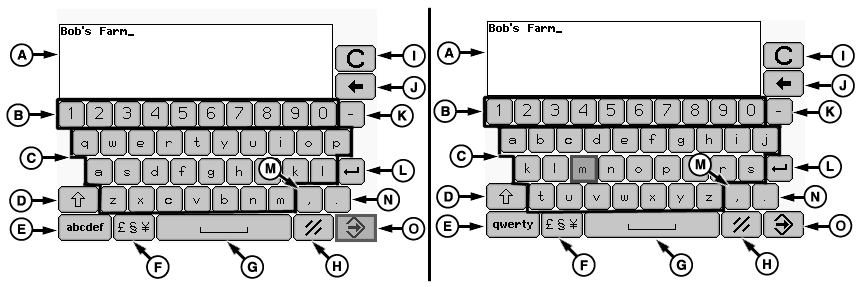
QWERTY Keyboard Layout / ABC Keyboard Layout
H87338-UN-19FEB07
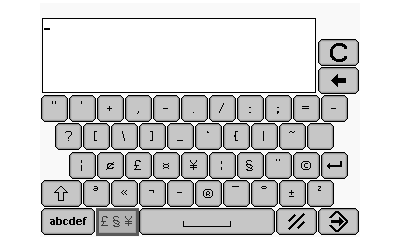
Symbols Keyboard Layout
A - Farm/Field Naming Display
B - Numeric Keys
C - Alpha Keys
D - Caps Lock/Shift Key
E - QWERTY (Standard Typewriter Keyboard Layout) or ABC Key
F - Symbols Key
G - Space Key
H - Cancel Key
I - Clear All Key
J - Backspace Key
K - Hyphen Key
L - Enter/Return Key
M - Comma Key
N - Period Key
O - Enter/Accept Key
QWERTY and ABC keyboard operate the same, depending on which keyboard is selected for operation.If “New” is selected, alpha numeric screen appears and allows you to name a farm or field.
H87354-UN-05FEB07
H87470-UN-20FEB07
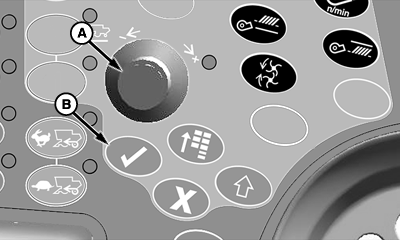
A - Selection Dial
B - Confirm Switch
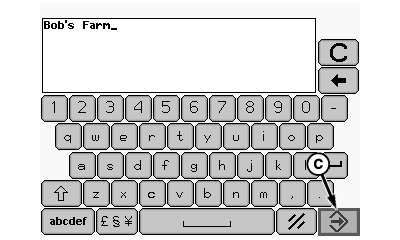
C - Enter/Accept Key
Rotate selection dial (A) until desired key is highlighted and press confirm switch (B).Repeat procedure as needed to name farm or field.
Once farm or field is named, rotate selection dial until enter/accept key (C) is highlighted and press confirm switch.
OUO6075,0000A3F-19-20080625 |