Setpoint Modes (Manual or Automatic)
H89379-UN-26JUL07
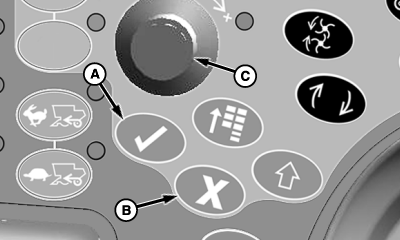
A - Confirm Switch
B - Cancel Switch
C - Selection Dial
Pressing confirm switch (A) or cancel switch (B) while a setpoint screen is displayed on CommandCenter will cause setpoint screen to disappear and return to home page.In addition pressing confirm switch or cancel switch will have the following affects while adjusting:
Press confirm switch while adjusting:
- Manual mode – system will deactivate.
- Automatic mode – system will continue adjusting in background.
Press cancel switch while adjusting:
- Manual mode – system will deactivate.
- Automatic mode – system will deactivate.
Turning selection dial (C) in both modes towards plus (+) symbol increases setpoint or towards minus (-) symbol decreases setpoint.
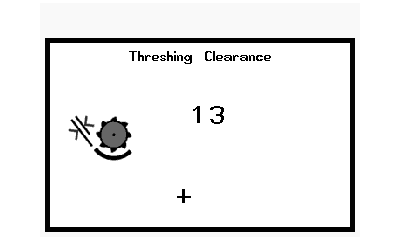
Manual Mode
H89384-UN-26JUL07
- HydraFlex Pressure
- Draper Speed
- Reel Speed
- Chaffer Opening
- Sieve Opening
- Threshing Clearance
- Cleaning Fan Speed
- Threshing Speed
Automatic Mode
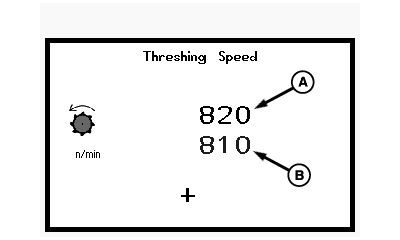
NOTE: Black number (A) indicates current setpoint and blue number (B) indicates setpoint value increase or decrease when selection dial is turned.
H89385-UN-26JUL07
A - Black Number
B - Blue Number
Engine at high idle and separator engaged the following setpoints can be adjusted:- Threshing Speed
- Cleaning Fan Speed
With engine running, the following setpoints can be adjusted:
- Threshing Clearance
- Chaffer Opening
- Sieve Opening
OUO6075,0000C11-19-20070803 |