Clear Crop Totals
NOTE:

H96262-UN-04MAY10
Harvesting Information Icon
H94550-UN-05OCT10
H94551-UN-05OCT10
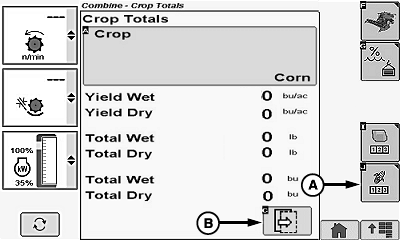
A - Crop Totals Icon
B - Next Page Icon
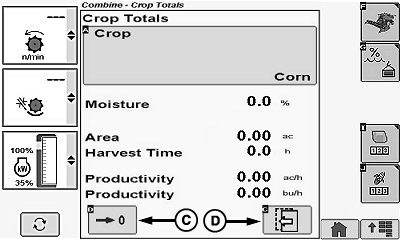
C - Crop Totals Reset Icon
D - Previous Page Icon
The following appears on GreenStar display (if equipped) instead of on armrest display.If machine is not equipped with moisture sensor, only the following Field Totals information appears:
- Area
- Harvest Time
- Productivity
Harvesting information icon switches between corn and wheat based on type of header connected to machine.
Touch or press confirm switch when harvesting information icon is highlighted.
Touch or press confirm switch when crop totals icon (A) is highlighted.
Touch or press confirm switch when next page icon (B) is highlighted to advance to next page.
Touch or press confirm switch when desired icon is highlighted:
- Crop Totals Reset Icon (C) - deletes crop totals for selected crop.
- Previous Page Icon (D) - allows operator to view previous page.
OUO6075,0000412-19-20100503 |