Setpoint Modes (Manual or Automatic)
H94659-UN-27JAN10
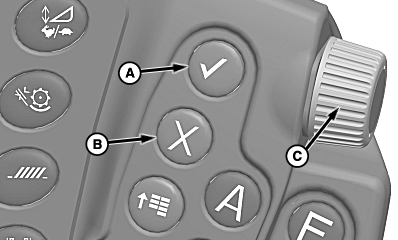
A - Confirm Switch
B - Cancel Switch
C - Selection Dial
Pressing confirm switch (A) or cancel switch (B) while a setpoint screen is displayed causes setpoint screen to disappear and return to home page.Pressing confirm switch or cancel switch has the following effects while adjusting:
- Press confirm switch while adjusting:
- Manual mode – system deactivates.
- Automatic mode – system continues adjusting in background.
- Press cancel switch while adjusting:
- Manual mode – system deactivates.
- Automatic mode – system deactivates.
Turning selection dial (C) in both modes either increases (forward) or decreases (rearward) setpoint.
Manual Mode
H95967-UN-07APR10
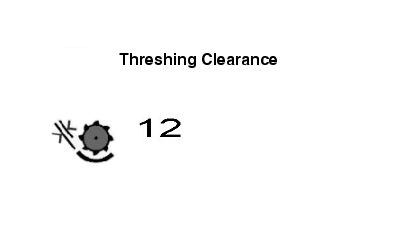
With key switch ON and separator and header disengaged the following setpoints can be adjusted:
- HydraFlex Pressure
- Draper Speed
- Reel Speed
- Chaffer Opening
- Sieve Opening
- Threshing Clearance
- Cleaning Fan Speed
- Threshing Speed
- Platform Fore/Aft Tilt
- Chopper Vane Angle
- Belt Speed
Press desired CommandARM™ switch.
Touch plus (+) or minus (-) symbol or rotate selection dial to setpoint.
Automatic Mode
NOTE:
H95966-UN-07APR10
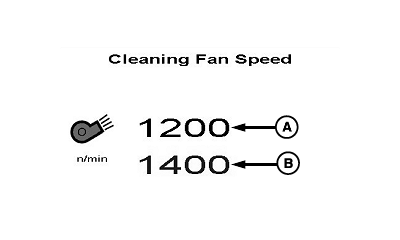
A - Black Value
B - Blue Value
Black value (A) indicates current setpoint. Blue value (B) indicates setpoint value increase or decrease when plus (+) or minus (-) symbol is touched or selection dial is turned.Provides advanced ”dial-in” function control.
With engine at high idle and separator engaged the following setpoints can be adjusted:
- Threshing Speed
- Cleaning Fan Speed
With engine running, the following setpoints can be adjusted:
- Chaffer Opening
- Sieve Opening
- Threshing Clearance
- Chopper Vane Angle
- Spreader Speed
- Header Height Rate
- Header Height Sensitivity
- Manual Lateral Tilt Sensitivity
- Automatic Lateral Tilt Sensitivity
- ProDrive Transmission Max Speed Range 1
- ProDrive Transmission Max Speed Range 2
- Header Height Sensing Float Position
Press desired CommandARM™ switch.
Touch plus (+) or minus (-) symbol or rotate selection dial to setpoint.
CommandARM is a trademark of Deere & Company | OUO6075,0000441-19-20101011 |