Harvest Smart Feed Rate Enable Switch (If Equipped)
H94714-UN-27JAN10
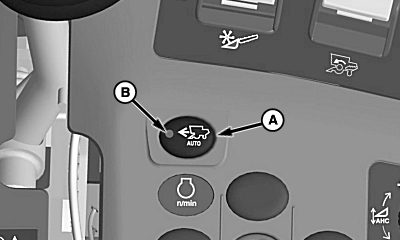
A - Harvest Smart Feed Rate Enable Switch
B - Indicator Light
Harvest Smart feed rate enable switch (A) allows machine to enable Harvest Smart and allows operator to select two operating modes (Smart and Capacity) or to turn OFF system. Indicator light (B) turns ON indicating system is active.Pressing Harvest Smart feed rate enable switch once causes screen to appear on display. With screen shown, press button again to change between the different modes (Smart, Capacity) and OFF.
H94716-UN-05OCT10
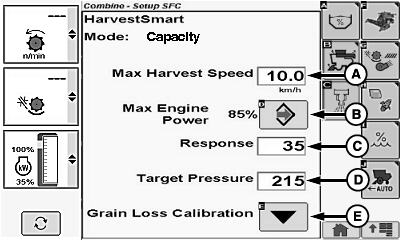
A - Maximum Harvest Speed
B - Maximum Engine Power
C - Machine Response Rate
D - Rotor Target Pressure (Capacity Mode)
E - Grain loss Calibration Icon
Screen displays the following:- Maximum Harvest Speed (A)
- Maximum Engine Power (B)
- Machine Response Rate (C)
- Rotor Target Pressure (Capacity Mode) (D)
- Grain loss Calibration Icon (E)
Touch or press confirm switch when desired setting is highlighted:
Touch plus (+) or minus (-) symbol or rotate selection dial until desired machine settings are reached.
Once desired machine settings are shown, touch or press confirm switch.
Repeat procedure on remaining settings as desired.
OUO6075,000044D-19-20100928 |