VisionTrak Performance Monitor— Operating

H94473-UN-31MAR10
Combine Setup Icon
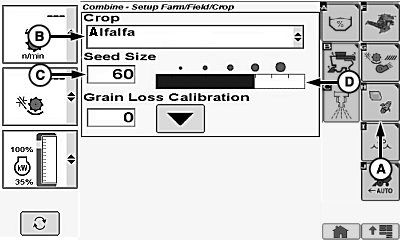
H94944-UN-05OCT10
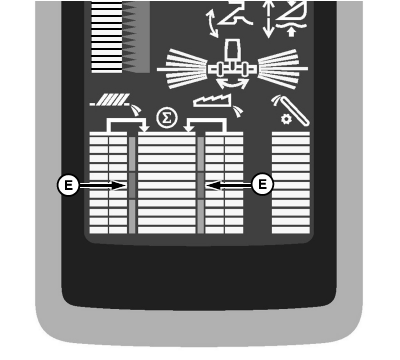
H94945-UN-06APR10
A - Crop Setup Icon
B - Crop Menu
C - Seed Size
D - Bar Graph
E - Normal Range
VisionTrak Performance Monitor is active when:- Engine is running.
- Road transport disconnect switch is in field position.
- Header and separator are engaged.
Touch or press confirm switch when combine setup icon is highlighted.
Touch or press confirm switch when crop setup icon (A) is highlighted.
Touch or press confirm switch when crop menu (B) is highlighted.
Crop menu displays the following:
Alfalfa | Lentils | Rye |
Barley | Lupins | Safflower |
Barley - Spring 1 | Millet | Sorghum |
Barley - Winter 1 | Mustard | Soybeans |
Canola | Navy Beans | Sunflower |
Chickpeas | Oats | Triticale 1 |
Corn | Peas | Wheat-Spring |
Edible Beans | Popcorn | Wheat-Winter |
Flax | Rape Seed 1 | |
Grass Seeds | Rice |
Once desired crop is chosen, touch or press confirm switch.
Touch or press confirm switch when seed size (C) is highlighted.
Touch plus (+) or minus (-) symbol or rotate selection dial until desired seed size is shown on bar graph (D).
NOTE: Setting seed size sensitivity will increase or decrease sensitivity of grain loss sensors.
Small Seed (Default 38) | Medium Seed (Default 50) | Large Seed (Default 70) |
|---|---|---|
Alfalfa | Barley | Chickpeas |
Canola | Barley - Spring 1 | Corn |
Flax | Barley - Winter 1 | Edible Beans |
Grass Seeds | Lentils | Lupins |
Millet | Popcorn | Navy Beans |
Mustard | Safflower | Peas |
Oats | Sorghum | Soybeans |
Rape Seed 1 | Wheat-Spring | Sunflowers |
Rice | Wheat-Winter | |
Rye | ||
Triticale 1 |
Once desired seed size is chosen, touch or press confirm switch.
Set the following on display:
Set desired number for closest grain size.
Adjust machine and header to acceptable loss levels for particular crop and condition.
NOTE: Ignore center bar graph on cornerpost at this time.
Operate machine at acceptable loss level.
Touch or press confirm switch when calibration icon is highlighted to center total loss in the normal range (E). Bar graph indicates machine is operating at total loss levels acceptable by operator in step 3.
NOTE: Bar graph is now a visual guide. Operator can refer to display periodically to know when an increase or decrease in total loss amount occurs. More detailed monitoring can be obtained by monitoring loss levels of the cleaning shoe and separator.
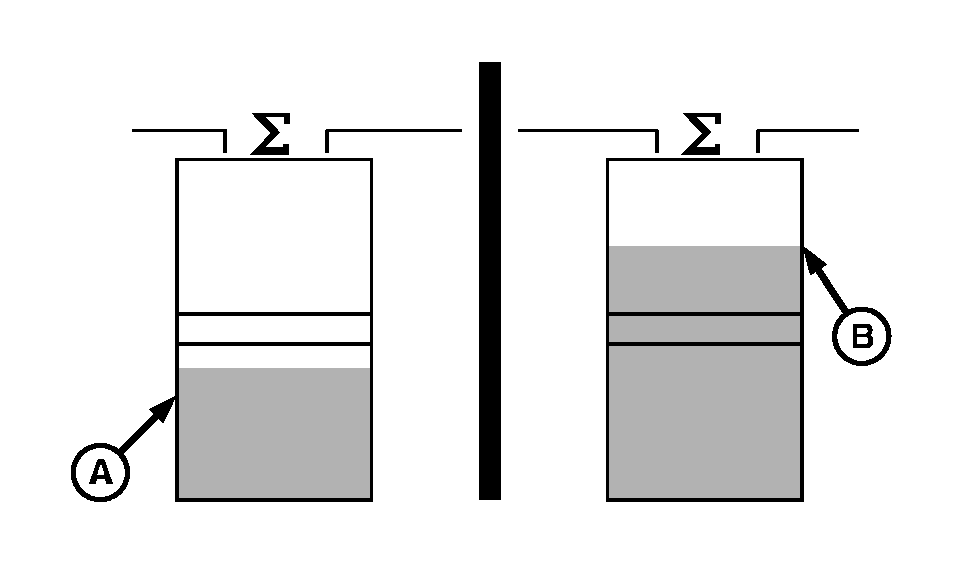
H87033-UN-30NOV06A - Downward
B - Upward
If bar graph moves downward (A), machine is not operating at maximum productivity. Machine is either incorrectly adjusted for acceptable loss levels or moving at too slow of a ground speed. Make adjustments as needed to bring bar graph back into middle of display area.If bar graph moves upward (B), machine is either incorrectly adjusted for an acceptable loss level or is moving too fast a ground speed. Make adjustments as needed to bring bar graph back into middle of display area.
When crop conditions change during the day (straw moisture, dew, etc.), make occasional loss checks to determine if readjustment is necessary.
NOTE: When machine encounters a ”slug”, middle bar graph will fluctuate upward (15 to 20 seconds) and return to previous reading. Ignore these fluctuations when this occurs.
1 European crop listing only. | OUO6075,00004C3-19-20101011 |