Accessing Diagnostic Trouble Code Menu
H95878-UN-29MAR10
Main Menu Icon (Display) / Main Menu Switch (Armrest)
H95846-UN-31MAR10
Message Center
Application Icon
Touch or press confirm switch when message center icon is highlighted.
H95508-UN-05OCT10
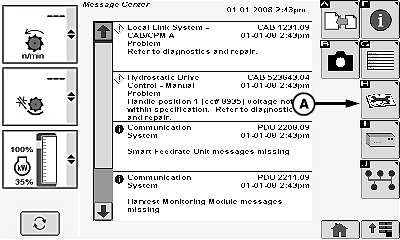
A - Trouble Codes Icon
Touch or press confirm switch when trouble codes icon (A) is highlighted.NOTE:

H95509-UN-05OCT10
A - Up Arrow
B - Down Arrow
C - Control Unit
D - Show All Menu
Another way to display diagnostic trouble codes is with show all menu (D). Touch or press confirm switch when show all menu is highlighted. This displays all trouble codes for all control units.Touch or press confirm switch when up arrow (A) or down arrow (B) is highlighted to scroll through control unit list.
Touch or press confirm switch when desired control unit (C) is highlighted.
H95511-UN-05OCT10
Individual Control Unit Trouble Codes
H95512-UN-05OCT10
All Control Unit Trouble Codes
H95533-UN-05OCT10
Detailed Code Description
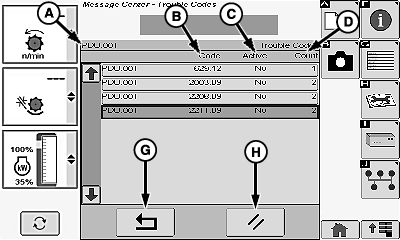
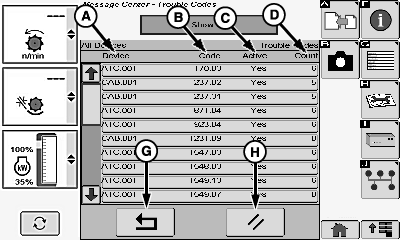
A - Control Unit/Device
B - Trouble Code
C - Active (Yes/No)
D - Count
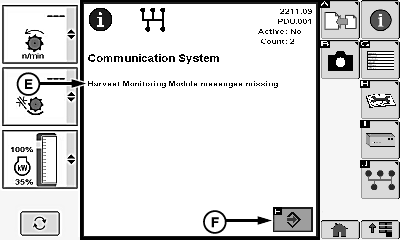
E - Code Description
F - Enter/Accept Icon
G - Return/Back Arrow Icon
H - Clear Icon
NOTE: Touch or press confirm switch when up arrow or down arrow is highlighted to scroll through trouble codes if multiple codes are displayed.
Screen displays the following:
- Control Unit (A)
- Trouble Code (B)
- Active (Yes/No) (C)
- Count (D)
Touch or press confirm switch when desired code is highlighted.
Code description (E) appears and gives more detail of trouble code.
Touch or press confirm switch when enter/accept icon (F) is highlighted to return to previous screen.
Touch or press confirm switch when return/back icon (G) is highlighted to return to previous screen or until clear icon (H) is highlighted.
H95878-UN-29MAR10
Main Menu Icon (Display) / Main Menu Switch (Armrest)
H95845-UN-31MAR10
Combine Main
Application Icon
Touch or press confirm switch when combine main page icon is highlighted.
OUO6075,00006C8-19-20100401 |