Rethresher Wear Strips and Rasp Bars—Remove and Install
 CAUTION:
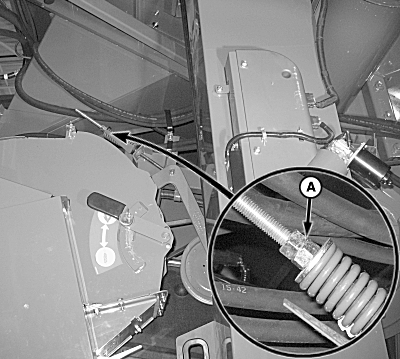
H97073-UN-13SEP10
A - Nuts
Shut OFF engine, set parking brake and remove key.Loosen nuts (A) to relieve belt tension from rethresher drive belt.
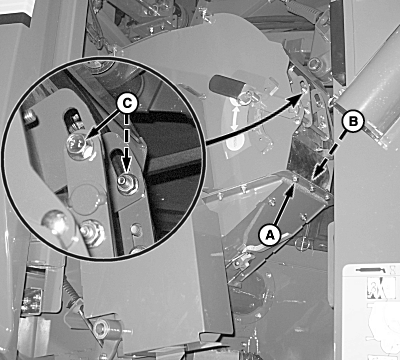
H97069-UN-13SEP10
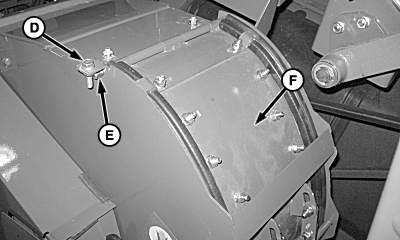
H97070-UN-13SEP10
A - Cap Screws (3 Used)
B - Strap
C - Shoulder Bolts (2 Used)
D - Cap Screw
E - Rod
F - Access Cover
Remove cap screws (A) and strap (B).Remove shoulder bolts (C), cap screw (D) and rod (E) from access cover (F).
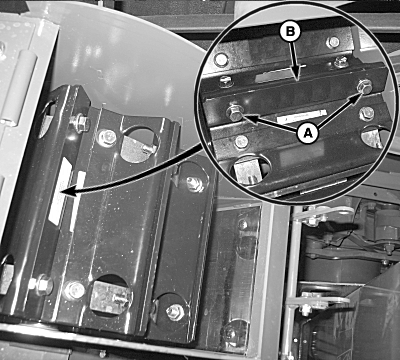
H97072-UN-13SEP10
A - Cap Screws and Nuts
B - Wear Strips
Remove cap screws and nuts (A) from wear strips.Remove and replace wear strips as needed.
Tighten wear strip cap screws to specification.
| Item | Measurement | Specification |
| Wear Strip Cap Screws | Torque | 70 N·m (52 lb.-ft.) |
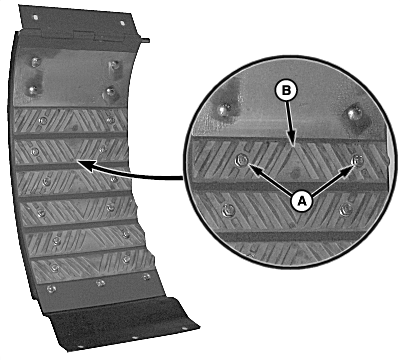
H97084-UN-23JUN10
A - Cap Screws and Nuts
B - Rasp Bar
Remove cap screws and nuts (A) from rasp bar (B).Remove and replace rasp bars as needed.
Tighten rasp bar cap screws to specification.
| Item | Measurement | Specification |
| Rasp Bar Cap Screws | Torque | 37 N·m ± 7 N·m (27 lb.-ft. ± 5 lb.-ft) |
NOTE: Verify seals on access cover remain in place when installing onto rethresher.
Install access cover onto rethresher and retain with rod and cap screw.
Install shoulder bolts and align rubber piece with holes and install strap and cap screws.
Adjust rethresher drive belt tensioner until washer is positioned between end of gauge and bottom of step.
OUO6075,0000815-19-20100914 |