Display Region Layouts
NOTE:
H94423-UN-04OCT10
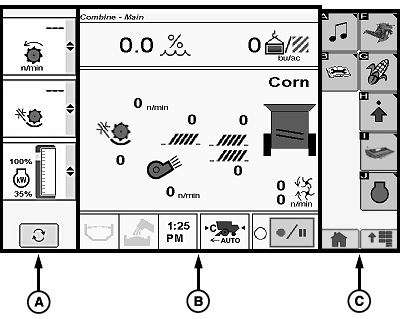
Display is divided into three regions:
- Left Region (A): allows operator to monitor and toggle between the following:
- Detail Machine Settings
- Guidance Information
- Performance Monitor Settings
- Center Region (B): allows operator to view and change machine settings in a wide variety of applications.
- Right Region (C): displays icon options available to operator from current screen.
- Selecting desired icon in right region displays a new screen, function, or allows changing of settings.
OUO6075,0000407-19-20101004 |