Layout Manager Application
H95878-UN-29MAR10
Main Menu Icon (Display) / Main Menu Switch (Armrest)
H95850-UN-31MAR10
Layout Manager
Application Icon
Touch or press confirm switch when performance monitor icon is highlighted.
Home Page Region Setup:
H95818-UN-05OCT10
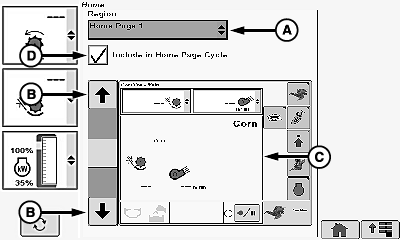
A - Region Menu
B - Up/Down Arrow Icons
C - Different Home Pages
D - Include in Home Page Cycle Box
Allows operator to show different home pages.Touch or press confirm switch when region menu (A) is highlighted.
Screen displays the following:
- Home Page 1
- Home Page 2
- Home Page 3
Once desired home page is chosen, touch or press confirm switch.
Touch or press confirm switch when up/down arrow icons (B) are highlighted to scroll through home pages (C).
Choose desired home page.
Touch or press confirm switch when include in home page cycle box (D) is highlighted.
- Checked - selected home page is included in home page cycle.
- Unchecked - selected home page will not be included in home page cycle.
NOTE: Touch or press confirm switch when home icon on any screen is highlighted to cycle through selected home pages. Home page switch on armrest also cycles through selected home pages.
H95878-UN-29MAR10
Main Menu Icon (Display) / Main Menu Switch (Armrest)
H95845-UN-31MAR10
Combine Main
Application Icon
Touch or press confirm switch when combine main page icon is highlighted.
OUO6075,00006FA-19-20100928 |