Armrest Display Navigation (GreenStar™ 3 2630 Display)
NOTE:
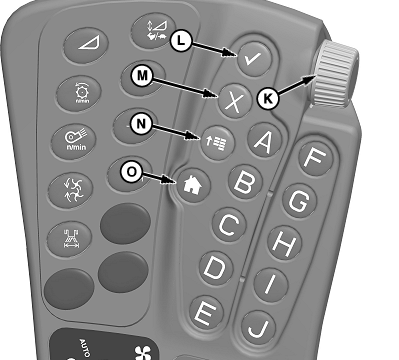
H94422-UN-04MAR10
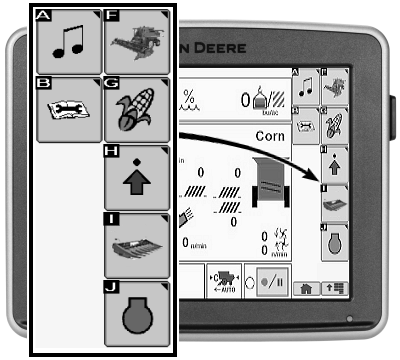
H94537-UN-30APR10
If GreenStar 3 2630 display is mounted as a second display on cornerpost, user interface module (UIM) will not control the navigation on the screen. Display on cornerpost only functions as a touchscreen.
Selection Dial and Confirm Switch Method:
Use selection dial (K) to highlight desired icons (A—J).
Once desired icon is highlighted, use the following dial and switches:
-
Selection Dial (K): Rotate dial to:
- Scroll through available items on selected page
- Increase or decrease values in a selected item
-
Confirm Switch (L): Once available
item is selected on display using selection dial, press switch to:
- Select item
- Toggle between available selections within item
- Enter/Save values
- Cancel Switch (M): Press switch to cancel a current selection.
Shortcut Switch Method:
Shortcut switch (A—J) allows a one-touch selection of desired input field or corresponding item on display.
- Shortcut Switches (A—J): Press to select corresponding icon on armrest display or GreenStar Display (if equipped).
Touchscreen Method:
IMPORTANT: Under no circumstance should touchscreen be contacted with an object harder or sharper than a fingertip (pen, pencil point, or any metal objects). Heavy pressure damages underlying components and voids warranty. Light amounts of pressure, if exerted continuously, can degrade touchscreen reliability.
- Touch desired icon on display.
Navigational Switches:
-
Main Menu Switch (N): Press switch
to change active application that display is running. Applications
include:
- Message Center
- Display Settings
- Layout Manager
- Combine
- Performance Monitor
- GreenStar
- Video
- Access Manager
- Home Switch (O): Displays user defined home screen. If multiple screens are defined, pressing home switch multiple times toggles through each defined home screen.
|
GreenStar is a trademark of Deere & Company |
OUO6075,0000406-19-20101103 |