Manual Recording ON/OFF
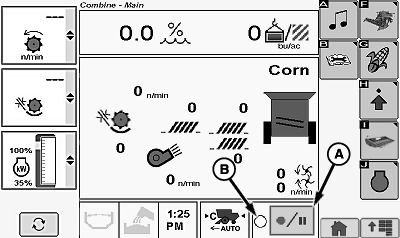
H94426-UN-04OCT10
A - Recording ON/OFF Icon
B - ON/OFF Indicator
Recording screen shows data recording status (ON/OFF).To start recording data, all the following must occur or be turned ON manually:
- Separator engaged
- Header is engaged
- Engine at high idle
- Header lowered to recording position
- Client, Farm, and Field must be named
To stop recording, one of the following must occur:
- Header raised past record stop height setpoint
- Header is disengaged
- Recording is manually turned OFF
Recording can be manually stopped and restarted without raising header or disengaging separator (example; when approaching headlands or end rows already harvested, waterways for which recording data is not desired).
Touch or press confirm switch when recording ON/OFF icon (A) is highlighted.
Recording ON/OFF indicator (B) toggles between an open or filled circle.
- Open circle - Recording OFF
- Filled flashing circle - Recording ON
Touch or press confirm switch again to turn recording ON and manually resume recording. Push header lower button on multi-function lever (slight touch of header lower button starts recording).
|
OUO6075,0000409-19-20101213 |