Change Crops and Seed Sensitivity Size
Crop Menu:

H94473-UN-31MAR10
Combine Setup Icon
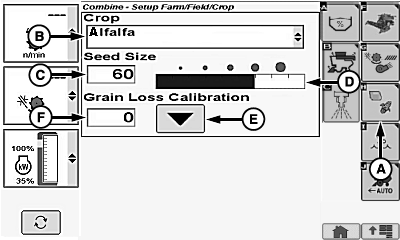
H94615-UN-05OCT10
A - Crop Setup Icon
B - Crop Menu
C - Seed Size
D - Bar Graph
E - Calibration Icon
F - Grain Loss Calibration Value
Touch or press confirm switch when combine setup icon is highlighted.
Touch or press confirm switch when crop setup icon (A) is highlighted.
Touch or press confirm switch when crop menu (B) is highlighted.
Crop menu displays the following:
|
Alfalfa |
Lentils |
Rye |
|
Barley |
Lupins |
Safflower |
|
Barley - Spring 1 |
Millet |
Sorghum |
|
Barley - Winter 1 |
Mustard |
Soybeans |
|
Canola |
Navy Beans |
Sunflower |
|
Chickpeas |
Oats |
Triticale 1 |
|
Corn |
Peas |
Wheat 1 |
|
Edible Beans |
Popcorn |
Wheat-Spring |
|
Flax |
Rape Seed 1 |
Wheat-Winter |
|
Grass Seeds |
Rice |
Once desired crop is chosen, touch or press confirm switch.
Seed Size:
Touch or press confirm switch when seed size (C) is highlighted.
Non-Touchscreen or Touchscreen: Rotate selection dial until desired seed size value is shown. Press confirm switch to save value.
Touchscreen Only: Enter desired seed size value on numeric display. Touch enter/accept icon to save value.
Desired seed size is represented on bar graph (D).
NOTE: Setting seed size sensitivity will increase or decrease sensitivity of grain loss sensors.
|
Small Seed (Default 38) |
Medium Seed (Default 50) |
Large Seed (Default 70) |
|---|---|---|
|
Alfalfa |
Barley |
Chickpeas |
|
Canola |
Barley - Spring 1 |
Corn |
|
Flax |
Barley - Winter 1 |
Edible Beans |
|
Grass Seeds |
Lentils |
Lupins |
|
Millet |
Popcorn |
Navy Beans |
|
Mustard |
Safflower |
Peas |
|
Oats |
Sorghum |
Soybeans |
|
Rape Seed 1 |
Wheat |
Sunflowers |
|
Rice |
||
|
Rye |
||
|
Triticale 1 |
Enter Grain Loss Calibration:
Adjust machine and header to acceptable loss levels for particular crop and condition.
Touch or press confirm switch when calibration icon (E) is highlighted.
NOTE: This enters current operating characteristics into memory and centers total loss activity indicator on cornerpost.
Calibration Reference Number:
Touch or press confirm switch when grain loss calibration value (F) is highlighted.
Non-Touchscreen or Touchscreen: Rotate selection dial until desired calibration reference value is shown. Press confirm switch to save value.
Touchscreen Only: Enter desired calibration reference value on numeric display. Touch enter/accept icon to save value.
|
1 European
crop listing.
|
OUO6075,0000425-19-20120627 |