Change Header Settings
NOTE:
H96245-UN-03MAY10
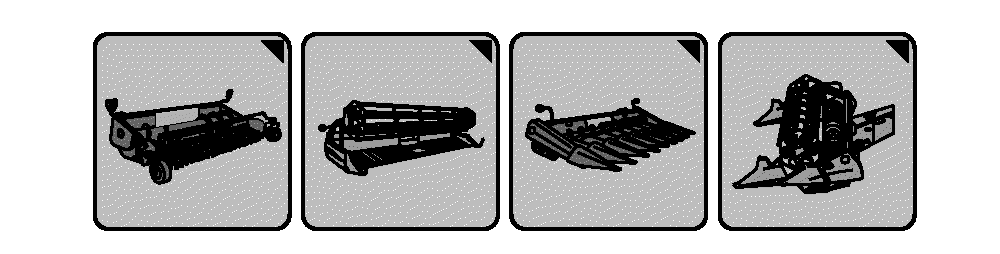
Header Setup Icons
H94622-UN-05OCT10
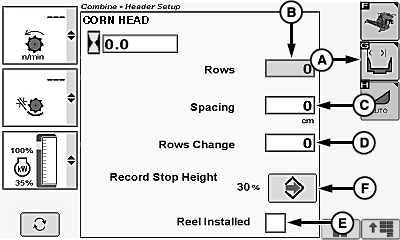
A - Header Width Setup Icon
B - Rows Box
C - Spacing Box
D - Row Change Box
E - Reel Installed Box
F - Record Stop Height Enter/Accept Icon
Header setup icon changes based on type of header connected to machine.Touch or press confirm switch when header setup icon is highlighted.
Touch or press confirm switch when header width setup icon (A) is highlighted.
Touch or press confirm switch when one of the following is highlighted:
Corn Head Display:
- Rows Box (B) - allows operator to set number of rows on corn head.
- Spacing Box (C) - allows operator to set row spacing on corn head.
- Rows Change Box (D) - allows operator to set row changes (not harvesting full width).
- Reel Installed Box (E) - allows operator in down or tangled crop conditions to enable a corn head reel system.
Non-Touchscreen or Touchscreen: Rotate selection dial until desired header value is shown. Press confirm switch to save value.
Touchscreen Only: Enter desired header value on numeric display. Touch enter/accept icon to save value.
Recording Stop Height:
NOTE: Recording automatically turns OFF at and above preset height and turns ON below preset height, provided all other conditions are met (separator/header engaged, engine at high idle, farm/field is setup), see Manual Recording ON/OFF in this section for information on temporarily overriding.
If Header Height Sensing or Active Header Float are active, record stop height setting is irrelevant and recording turns ON, provided all other conditions are met (separator/header engaged, engine at high idle, farm/field is setup).
Raise or lower header to desired record stop height.
Touch or press confirm switch when record stop height enter/accept icon (F) is highlighted to save value.
Draper/Platform/Belt Pickup Display:
H94623-UN-05OCT10
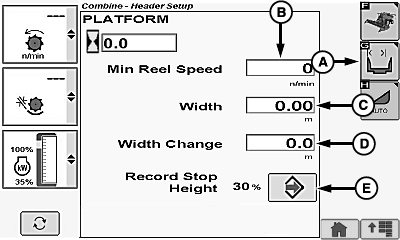
A - Header Width Setup Icon
B - Minimum Reel or Belt Pickup Speed Box
C - Width Box
D - Width Change Box
E - Record Stop Height Enter/Accept Icon
- Minimum Reel or Belt Pickup Speed Box (B) - allows operator to set minimum reel or belt pickup speed.
- Width Box (C) - allows operator to set cut width on platforms.
- Width Change Box (D) - allows operator to set cut width changes (not harvesting full width).
Non-Touchscreen or Touchscreen: Rotate selection dial until desired header value is shown. Press confirm switch to save value.
Touchscreen Only: Enter desired header value on numeric display. Touch enter/accept icon to save value.
Recording Stop Height:
NOTE: Recording automatically turns OFF at and above preset height and turns ON below preset height, provided all other conditions are met (separator/header engaged, engine at high idle, farm/field is setup), see Manual Recording ON/OFF in this section for information on temporarily overriding.
If Header Height Sensing or Active Header Float are active, record stop height setting is irrelevant and recording turns ON, provided all other conditions are met (separator/header engaged, engine at high idle, farm/field is setup).
Raise or lower header to desired record stop height.
Touch or press confirm switch when record stop height enter/accept icon (E) is highlighted to save value.
|
OUO6075,0000428-19-20120627 |