Change Moisture Settings and Yield Units Settings
Moisture Sensor Settings:
NOTE:

H94473-UN-31MAR10
Combine Setup Icon
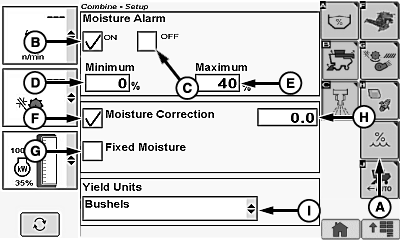
H94624-UN-05OCT10
A - Moisture Setup Icon
B - ON Box
C - OFF Box
D - Minimum Box
E - Maximum Box
F - Moisture Correction Box
G - Fixed Moisture Box
H - Value/Change Box
I - Yield Units Menu
Page appears if equipped with moisture sensor.Touch or press confirm switch when combine setup icon is highlighted.
Touch or press confirm switch when moisture setup icon (A) is highlighted.
Touch or press confirm switch when ON box (B) or OFF box (C) is highlighted.
Box displays a checkmark indicating which was selected.
- Moisture Alarm ON Box - moisture alarm sounds when value drops below minimum setting or above maximum setting (operator presets).
- Moisture Alarm OFF Box - moisture alarm will not sound when value drops below minimum setting or above maximum setting (operator presets).
Touch or press confirm switch when minimum box (D) or maximum box (E) is highlighted.
NOTE: This determines setpoint (minimum and maximum) for activation of moisture alarm.
- Minimum Moisture Alarm Box - operator selects moisture percentage for alarm to sound when value drops below preset value.
- Maximum Moisture Alarm Box - operator selects moisture percentage for alarm to sound when value is above preset value.
Non-Touchscreen or Touchscreen: Rotate selection dial until desired value is shown. Press confirm switch to save value.
Touchscreen Only: Enter desired value on numeric display. Touch enter/accept icon to save value.
Moisture Correction/Fixed Moisture Settings:
Touch or press confirm switch when moisture correction box (F) or fixed moisture box (G) is highlighted.
Box displays a checkmark indicating which was selected.
IMPORTANT: Changing moisture correction will not change data already saved. After changes are made, all harvest information collected from that point will reflect the changes.
-
Moisture Correction Box - set moisture correction to difference
between combine moisture sensor and elevator certified moisture sensor
(example: elevator moisture (13%) minus combine measured moisture
(12%) = moisture difference (+1%.)
NOTE: Moisture difference can be a positive or negative number.
- Fixed Moisture Box - moisture sensor reading is disabled and forces preset moisture values.
Touch or press confirm switch when value/change box (H) is highlighted.
Non-Touchscreen or Touchscreen: Rotate selection dial until desired value is shown. Press confirm switch to save value.
Touchscreen Only: Enter desired value on numeric display. Touch enter/accept icon to save value.
Yield Units Settings:
Touch or press confirm switch when yield units menu (I) is highlighted.
Yield units menu displays the following:
|
Bushels |
Hundred Weight |
Metric Tons |
|
Barrels |
Pounds |
Tons |
|
Sacks |
Kilograms |
Once desired yield unit is chosen, touch or press confirm switch.
|
OUO6075,0000429-19-20120627 |