Header Setup Screen
H94605-UN-05OCT10
H94606-UN-05OCT10
Header Settings:
-
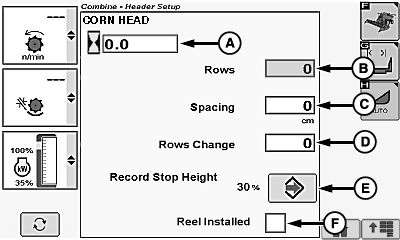
Corn Head and Hour Counter 1 (A)
- Header Type (Auto Detection)
- Total Rows (Rows, Based on Type, Numeric Entry) (B)
- Row Spacing (C)
- Row Change (Decrease Cut Rows) (D)
- Record Stop Height (Height Setup for Turning Recording ON/OFF) (E)
- Reel Installed Box (F)
-
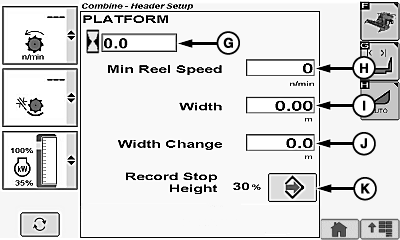
Draper/Platform/Belt Pickup and Hour Counter 1 (G)
- Header Type (Auto Detection)
- Minimum Reel or Belt Pickup Speed (H)
- Total Width (Total Width, Based on Type, Numeric Entry) (I)
- Width Change (Decrease Cut Width) (J)
- Record Stop Height (Height Setup for Turning Recording ON/OFF) (K)
H100558-UN-03MAR11
Corn Head Display
H96215-UN-05OCT10
Platform Display
Automatic Header Control (AHC) Settings:
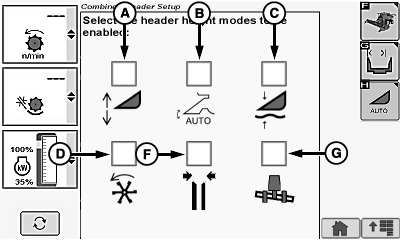
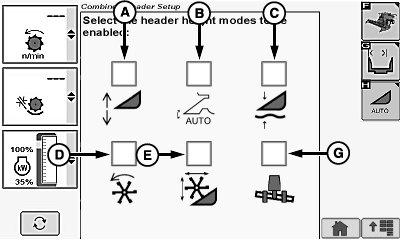
- Header Height Sensing Enable (A)
- Header Height Resume Enable (B)
- Active Header Float Enable (C)
- Dial-A-Speed Enable (D)
- Reel Position Resume Enable2 (E)
- Deck Plate Position Resume Enable3 (F)
- Lateral Tilt Enable4 (G)
|
1 For information on resetting header hours, see
your John Deere dealer.
|
OUO6075,000042C-19-20100824 |