Folding Functions Setup
NOTE:

H94473-UN-31MAR10
Combine Setup Icon
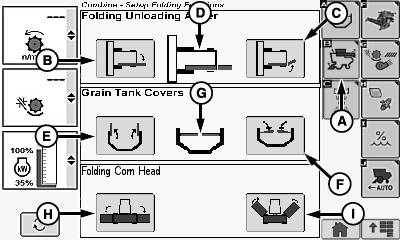
H94648-UN-05OCT10
A - Folding Functions Setup Icon
B - Unfold Icon
C - Fold Icon
D - Auger Position Indicator
E - Unfold Icon
F - Fold Icon
G - Grain Tank Position Indicator
H - Unfold Icon
I - Fold Icon
Screen shows all optional folding features. Folding feature always defaults to top portion of screen depending on options.Touch or press confirm switch when combine setup icon is highlighted.
Touch or press confirm switch when folding functions setup icon (A) is highlighted.
Folding Unloading Auger (If Equipped)
Touch or press confirm switch when desired icon is highlighted.
- Unfold Icon (B)
- Fold Icon (C)
- Auger Position Indicator (D)
NOTE: Folding unloading auger is an automatic feature. Auger begins to fold or unfold automatically when desired icon is selected.
Screen indicates if unloading auger has not reached the following:
- Complete unfolded (field) position. Unloading auger will not work unless fully unfolded.
- Complete folded (transport) position after operator folds unloading auger.
Grain Tank Covers (If Equipped):
 CAUTION: Avoid power line entanglement. Grain tank covers must
be closed before transporting machine.
CAUTION: Avoid power line entanglement. Grain tank covers must
be closed before transporting machine.
NOTE: Grain tank covers must be opened all the way in order to engage separator.
Touch or press and hold confirm switch when desired icon is highlighted.
- Unfold Icon (E)
- Fold Icon (F)
- Grain Tank Position Indicator (G)
Covers unfold or fold depending on which icon was selected.
NOTE: Covers automatically fold or unfold when desired icon is touched or confirm switch is pressed.
Folding Corn Head (If Equipped):
Touch or press confirm switch when desired icon is highlighted.
- Unfold Icon (H)
- Fold Icon (I)
Corn head unfolds or folds depending on which icon was selected.
|
OUO6075,0000431-19-20100824 |