Header Height Sensing
NOTE:
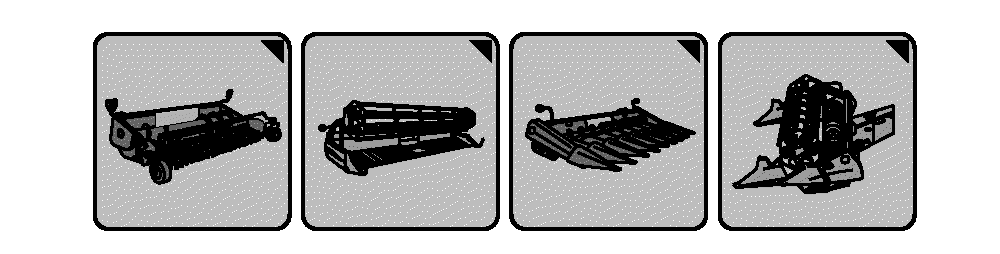
H96245-UN-03MAY10
Header Setup Icons
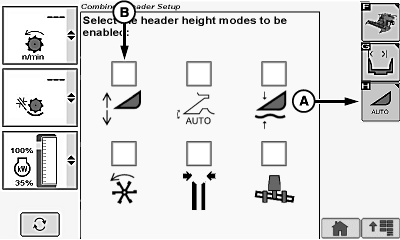
H95936-UN-05OCT10
Corn Head Display
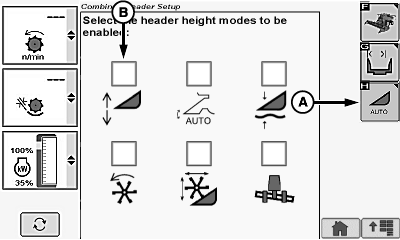
H95935-UN-05OCT10
Draper/Platform/Belt Pickup Display
A - Automatic Header Height Modes Icon
B - Header Height Sensing Icon
Header setup icon changes based on type of header connected to machine.Allows the operator to select the position of the header relative to the ground and return to that position automatically.
System must be calibrated with each header that is used (see Calibration Procedures section).
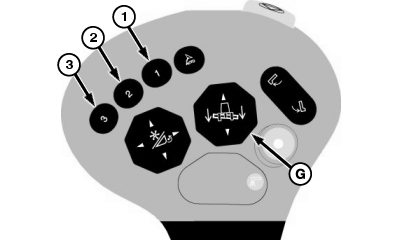
Activation buttons 1, 2 or 3 located on the multi-function lever are used to select one of the three different programmable header heights.
NOTE: If multiple modes are enabled, refer to Activation Button Mode Combinations in this section for further information.
Enable/Disable System:
Touch or press confirm switch when header setup icon is highlighted.
Touch or press confirm switch when automatic header height modes icon (A) is highlighted.
Touch or press confirm switch when Header Height Sensing icon (B) is highlighted.
NOTE: Checkmark appears indicating system is enabled or disappears indicating system is disabled.
Operation:
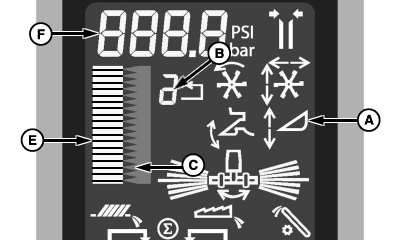
H99253-UN-01DEC10
H95079-UN-27JAN10
H95077-UN-18DEC09
A - Header Height Sensing Icon
B - Activation Button Number
C - Height Setpoint
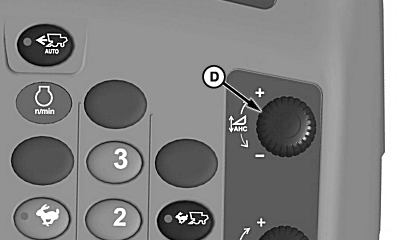
D - Header Height Control Dial
E - Bar Graph
F - Numeric Display
G - Header Raise/Lower Switch
System is active when:- Properly equipped header is connected to machine.
- Engine is running.
- Road transport disconnect switch is in field position.
- Header Height Sensing system enabled.
- Header is engaged.
Activate Header Height Sensing by pressing activation buttons 1, 2 or 3 on multi-function lever.
Activation button number (B) on display indicates which activation button was selected.
Header Height Sensing icon (A) appears on display indicating system is active.
To change height setpoint (C) of activation buttons, press desired activation button and adjust height using active header height control dial (D).
Turn active header height control dial towards plus (+) symbol to raise header and setpoint or towards minus (-) symbol to lower header and setpoint.
Bar graph (E) and numeric display (F) show the header's relative position based on the Header Height sensor linked to the header.
NOTE: Header lower switch can be set to immediately disable system until activation button is pressed, see your John Deere dealer for further information.
Manually adjusting header height with header lower switch (G) temporarily overrides system until released. Once switch is released, system returns to automatic mode.
NOTE: Header lower switch can be set to not reactivate system when header lower switch is pressed, see your John Deere dealer for further information.
Using header raise switch (G) temporarily deactivates system until header lower switch is pressed. Once switch is pressed, system reactivates.
Press activation buttons 1, 2 or 3 to reactivate system. Header automatically moves to preselected height.
|
OUO6075,00004C7-19-20101201 |