Change Machine Settings
Machine Settings:

H94473-UN-31MAR10
Combine Setup Icon
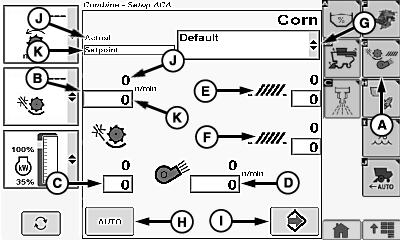
H94611-UN-05OCT10
A - Machine Settings Icon
B - Threshing Speed
C - Threshing Clearance
D - Fan Speed
E - Chaffer Clearance
F - Sieve Clearance
G - Crop Modifiers Menu
H - Auto Icon
I - Save Icon
J - Actual Setting
K - Setpoint Setting
Touch or press confirm switch when combine setup icon is highlighted.
Touch or press confirm switch when machine settings icon (A) is highlighted.
Touch or press confirm switch when one of the following is highlighted:
-
Threshing Speed (B)
- 200 - 1000 rpm, increments of 10 rpm
-
Threshing Clearance (C)
- 0 - 40 mm, increments of 1 mm1
-
Fan Speed (D)
- 620 - 1350 rpm, increments of 10 rpm
-
Chaffer Clearance (E)
- 0 - 22 mm (General Purpose) and 0 - 30 mm (Deep Tooth), increments of 1 mm1
-
Sieve Clearance (F)
- 0 - 20 mm (General Purpose and Deep Tooth), increments of 1 mm1
Non-Touchscreen or Touchscreen: Rotate selection dial until desired machine value is shown. Press confirm switch to save value.
Touchscreen Only: Enter desired machine value on numeric display. Touch enter/accept icon to save value.
Repeat as needed for other machine settings.
Change Crop Modifiers Menu:
Touch or press confirm switch when crop modifiers menu (G) is highlighted.
Crop modifiers menu displays the following:
- Default - displays factory default settings for selected crops.
- Dry (Default) - displays factory default settings for corn.
- Wet (Default) - displays factory default settings for corn.
- New - select when a set of custom/personal crop settings will be entered.
- Clean Out - displays factory default settings allowing machine to be cleaned out.
Once desired crop modifier is chosen, touch or press confirm switch.
Auto or Save Icon:
Touch or press confirm switch when auto icon (H) or save icon (I) is highlighted.
- Auto - Desired machine settings are chosen by operator and automatically adjust to settings shown on screen.
-
Save - Allows operator to save personal machine settings if
new was chosen from crop modifiers menu.
NOTE: One set of personal settings may be saved for each crop
and named "Custom 1". An additional nine sets of personal settings
may also be saved. These nine sets may be distributed among different
crops as required. When one of these sets is used, it will be named
starting with "Custom 2" (example: second set of personal settings
for CORN and WHEAT will both be named "Custom 2"). Third set of personal
settings for CORN will be named "Custom 3". Personalizing machine
settings will not override factory settings.
Actual (J) or Setpoint (K):
- Actual (setpoint value in black) - indicates current setpoint value of machine.
- Setpoint (setpoint value in blue) - machine automatically adjusts to operator setpoint value.
|
1 Manual operation is allowed above these values,
but not shown on display until a decrease is indicated by operator.
|
OUO6075,0000517-19-20120626 |