Service Intervals—Clearing or Delaying
 CAUTION:
H95878-UN-29MAR10
Main Menu Icon (Display) / Main Menu Switch (Armrest)
H95847-UN-12OCT10
Performance Monitor
Application Icon
IMPORTANT: Service times are for average conditions. Service more often if machine is used in extreme conditions.
NOTE: See Break-In Service section for information on Service Intervals for First 100 Hours of Machine Operation.
Press main menu icon or switch.
Touch or press confirm switch when performance monitor icon is highlighted.
H95957-UN-05OCT10
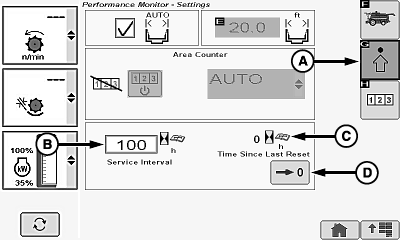
A - Advanced Settings Icon
B - Service Alarm Interval
C - Time Since Last Reset
D - Reset Icon
Touch or press confirm switch when advanced settings icon (A) is highlighted.Touch or press confirm switch when service alarm interval (B) is highlighted.
Non-Touchscreen or Touchscreen: Rotate selection dial until desired service interval is shown. Press confirm switch to save value.
Touchscreen Only: Enter desired service interval on numeric display. Touch enter/accept icon to save value.
NOTE: Use service screen as a guide to when the machine needs to be serviced.
Service screen appears every 50 hours of engine operation, indicating machine needs to be serviced.
When service screen appears, two choices can be selected:
- Operator can choose to ignore servicing machine at this time.
- Operator can choose to service machine at this time.
NOTE: If operator selects return/back icon ignoring service at this time the screen disappears. The next time the key switch is turned to the ”RUN” position the screen will appear.
Time since last reset (C) appears and alerts operator the amount of hours that has passed since being serviced.
After service is performed, touch or press confirm switch when reset icon (D) is highlighted to reset to zero.
H95878-UN-29MAR10
Main Menu Icon (Display) / Main Menu Switch (Armrest)
H95845-UN-31MAR10
Combine Main Application Icon
Press main menu icon or switch.Touch or press confirm switch when combine main page icon is highlighted.
|
OUO6075,00005F1-19-20120627 |